• Scam Alert. Members are reminded to NOT send money to buy anything. Don't buy things remote and have it shipped - go get it yourself, pay in person, and take your equipment with you. Scammers have burned people on this forum. Urgency, secrecy, excuses, selling for friend, newish members, FUD, are RED FLAGS. A video conference call is not adequate assurance. Face to face interactions are required. Please report suspicions to the forum admins. Stay Safe - anyone can get scammed.

Laser Engraving

Before I got the laser engraver, while I was making a lot more jewelry, I had tried my hand at hand engraving with gravers and a graving vice. That method gives you much more control of the depth and angle of the engravings, but takes quite a bit of patience and control.
 
Wait just a second here... you have a CNC engraver.. and you use it make templates for your manual engraver? No criticism I just don't quite follow.
Two things occur to me, first, with a cutter you are going to get a cut V profile which would look better. With a diamond dragger you get a very fine cut line, can;t see the laser looking as nice. Secondly scale. CNC the thing much larger than you need than produce very small, finely cut script or logos etc.
 
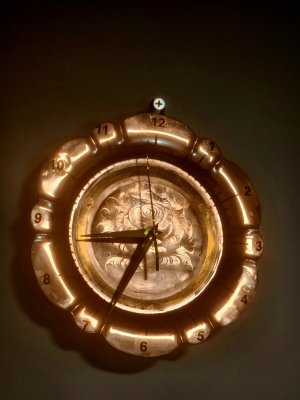
I found this bronze plated coper plate at an antique store and came up with the idea to make it into a decorative clock. Since the plate was only plated with bronze I took advantage of that and used my fiber laser to make a reflective relief engraving by making the image negative. The circle in the center is the only other part that still has bronze plating, I polished everything else around the outside; and every three sections of the marks around the clock had to be done individually because of the lasers smaller sized work area.
1000000634.jpg
 
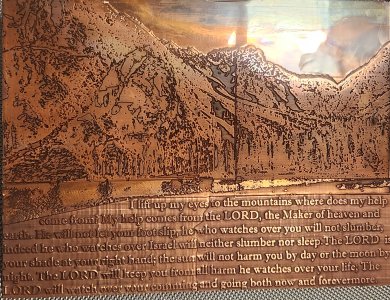
I finally finished my latest fiber laser engraved plaque. Due to my choice to use pure 1/8" copper greatly prolonged the time it took to etch every part because of how heat conductive it is and how reflective copper is. My gweike cloud g2 max only has a working area of 6" x 6" so I had to etch the plaque in four pars and line them up as best I could.

The picture is a very detailed mountain scene to match the text, and I used a photo converted to grayscale to etch a 3d image using light burns 3d slice method. That probably also played a part in the time it took.

Though it took so much time, it may not have been a mistake to use copper because its color matches the picture, and I also was able to use a oxyfuel torch afterwards to patina the top as the sky which turned out as highly realistic overhead clouds and distant sunset. To match the sunset I came up with the idea to polish an arc just above the horizon to act as the bright sun by it's highest reflection.
1000002950.jpg
 
The entire plate is 8 x 12 inches and 1/8" thick. The deepest parts of the engraving are about 1/32" deep. I tried matching the two parts of the picture apart from the text by using the same settings and number of passes roughly 350 passes each section at a speed of 1000, full power, and frequency of 20. It took about a total of 90hrs to complete. I made sure I ran the machine only18hrs continuously with a 12hr cooling time to prevent over heating.

The text was done at a different speed to give a different color behind the text for higher contrast. I'm now designing an adjustable jig for square and rectangular sheet metal to make it easier to realign the work in the workspace when I have to rotate it to complete it in multiple parts. The framing feature of the fiber laser is very accurate, but its hard to visualize positioning of the material as close as the nearest 100th of a millimeter with high enough stability. That is the only thing that caused the lines in the middle.
 
18hrs on and 12hrs off? I would expect that if it was going to overheat it would do it well before 18hrs are up, like 20 or 30 minutes on time, maybe up to an hour max. After a few hrs I'd expect it to be in a steady state condition basically.
What that tells me is you can very likely run it continuously without any built in machine protections kicking in. Does the machine have an internal temperature monitor you can track or look at?
 
The machine does have an inner temperature monitor for operation conditions. The machine will stop firing when it comes close to over heating, and the laser source is within an enclosure with a strong fan for more rapid air cooling. I also put a strong fan next to the laser source for additional cooling. The the total life span of the fiber laser source is said to be 100 000 hrs.

I did more research on the recommended limitations, and I definitely agree that this machine is most likely not designed to handle such high demand of deeply engraving very detailed large photos on copper. That is why I'll either stick to brass, or try etching bronze, at a slower pace.
 
The entire plate is 8 x 12 inches and 1/8" thick. The deepest parts of the engraving are about 1/32" deep. I tried matching the two parts of the picture apart from the text by using the same settings and number of passes roughly 350 passes each section at a speed of 1000, full power, and frequency of 20. It took about a total of 90hrs to complete. I made sure I ran the machine only18hrs continuously with a 12hr cooling time to prevent over heating.
90 hrs for 1/32" depth? What wattage is you machine? That's a hell of a long run....
 
18hrs on and 12hrs off? I would expect that if it was going to overheat it would do it well before 18hrs are up, like 20 or 30 minutes on time, maybe up to an hour max. After a few hrs I'd expect it to be in a steady state condition basically.
What that tells me is you can very likely run it continuously without any built in machine protections kicking in. Does the machine have an internal temperature monitor you can track or look at?
I read that and was confused as well, but maybe he meant 1/8 hour on (7.5 minutes) and 1/2 off (30 minutes) , which seems, well, still a long run time, but probably more adequate to keep things cool...
 
My eyes may be fooling me on the depth I achieved. By comparing it to the top of unengraved areas I can still tell it was not much. I was aiming for 1/16" as in half the thickness, but I decided to quit when I was satisfied, most likely 3/64" deep.
Though my machine is 50watts I did have to run it for a total time of 80 - 90 hrs because copper is extremely difficult to engrave. When etching brass I can get 1/8" of depth in half the time because Zinc vaporizes very easily. It might also have had something to do with the focus, because I tried lowering the laser head to the point of focus in the engraved area every 3 hours, but no mater what the laser kept rounding the edges of the text which was not 3d sliced. The text would have been deeper and sharper if it stayed in the same position the entire time.

You should also remember that the entire detailed picture was done in 3d slice mode for a 3d etching rather than an even surface engraving. In that case it would take much longer to process by the adjusting levels of power with depth. The deepest parts of the picture reached about 1/32 in about36 - 48 hrs. It was the fine detail I also wanted to make more visible that kept it going.
 
I'm beginning to think there may have been some interference from the machine's cooling system when running it at 100% power continuously all day. I didn't pay much attention to it as I worked on other things in the shop, and I knew it was under the laser shield. Thinking also about what John said earlier about the laser dot size, I had that set to 0.08mm.
What's more is, because it had to be done in four sections it took about 1440 passes in total not including the cleaning pass between every 2 cutting cutting passes, running at a speed of only 1000, and a line space of 0.02mm for fine detail.
 
Last edited:
I'm beginning to think there may have been some interference from the machine's cooling system when running it at 100% power continuously all day.
Curious why you feel it's not cooling? Fiber lasers (low wattage units) are passively cooled so unless your fans aren't working it should be performing properly.
because it had to be done in four sections it took about 1440 passes in total not including the cleaning pass between every 2 cutting cutting passes,
Was that 1440 between the 4 sections, or for each section? Anything beyond 256 is academic for a depth map. Reducing the amount of clean up passes would have likely sped things up. Having only engraved copper once I don't recall if it was really necessary. Air assist would be a benefit though.
 
I made sure I ran the machine only18hrs continuously with a 12hr cooling time to prevent over heating.

Gotta be something wrong there Chris. I agree with others. Unless the thing is the size of a school bus, 18 hours at full power would hit max temp easily. If that doesn't kill it, it's hard for me to rationalize the need to shut it down at all.

What don't we understand?
 
1440 was the number of passes in total (all four sections put together). Every section was 360 passes.
Gotta be something wrong there Chris. I agree with others. Unless the thing is the size of a school bus, 18 hours at full power would hit max temp easily. If that doesn't kill it, it's hard for me to rationalize the need to shut it down at all.
Yeah if this is the case then what I was saying in the previous post was, the cooling monitor must have forced the machine to stop firing at some point and continue after cooling to an operational temperature. A few times I ran the machine overnight (10-12hrs) in a safe area under the laser shield, and checked it in the morning to see how deep it was. Every time I had to let it continue for about 6 more hours and shut it down for the next night to reach a depth I was satisfied with.
By how surprised/confused you all are, I'm thinking of contacting Gweike cloud to find clarity on what would have happened over such a prolonged time of engraving at full power.
 
Back
Top