• Scam Alert. Members are reminded to NOT send money to buy anything. Don't buy things remote and have it shipped - go get it yourself, pay in person, and take your equipment with you. Scammers have burned people on this forum. Urgency, secrecy, excuses, selling for friend, newish members, FUD, are RED FLAGS. A video conference call is not adequate assurance. Face to face interactions are required. Please report suspicions to the forum admins. Stay Safe - anyone can get scammed.
  • The 2026 Calgary Area Meetup is set for Saturday May 30th at 10am. The signup thread is here! Robinhood has graciously offered to host the meetup again this year. Please note that you MUST RSVP to the notice linked above if you wish to come.

3D Printer Happened

I recommend this guy (filtered on 'Bambu'). He gets to the point & is quite throrough.

probably start with this one
1783087758110.png
 
.F3D is just for Fusion360 CAD
In the Bamu Studio app, the leftmost tab is Prepare. This is where you add, position and adjust your model and assign filaments and print profiles.

Thank you for this. It's exactly what I needed right now.

I installed Bambu Studio per @jcdammeyer instructions. Then I followed your simple yet informative instructions above.

For the benefit of other newbs reading this, after you click the PREPARE tab, you needed to add click on the box with a plus sign on it. This opens your browser where you can select the file. If you want, I can edit your instructions to add that for the benefit of other newbs.

The tray loaded on its side. So I flipped it bottom down. I just assumed that was probably required.

Next I sliced accepting all defaults.

Then printed accepting all defaults.

It says it will take an hour and a half.

A camera view of the process just popped onto my screen! Nothing is happening. But I think it is happening because the progress is already at 10%. The time stamp on the photo is 10 minutes ago.

I'll try watching it on the app.

If that doesn't work, I'll head out to the shop.
 
Print is taking longer than I expected. Bottom is fairly thick.

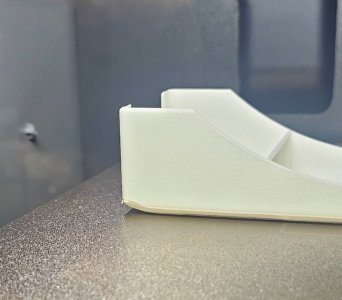
Finally done the bottom and printing sides. The rounded bottom is causing the corners to lift a bit. Not yet sure if that is a problem.
 
Print is taking longer than I expected. Bottom is fairly thick.

Finally done the bottom and printing sides. The rounded bottom is causing the corners to lift a bit. Not yet sure if that is a problem.
There are various solutions to corner lifting. Generally some sort of glue. I 'borrowed' my wife's hair spray and periodically pull the tray out, give it a light misting. Seems to work well with PLA. Too well with PETG. Another reason for being able to place smaller parts on various places.

Anyway there will be lots of opinions on corner lifting.
 
Print is taking longer than I expected. Bottom is fairly thick.

Finally done the bottom and printing sides. The rounded bottom is causing the corners to lift a bit. Not yet sure if that is a problem.
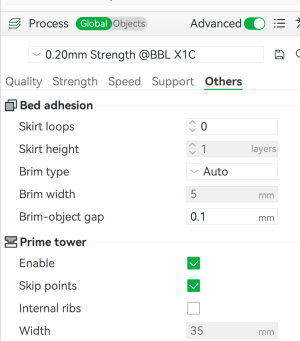
In Bambu studio go to the panel on the left and click on OTHERS, Under BED AHESION, click on BRIM TYPE, OUTER BRIM ONLY.
This will print a removable lip around the outside of the object that generally helps tp keep the piece flat. Letting the part fully cool before removing from the print bed helps as well
1783095572544.png
 
In Bambu studio go to the panel on the left and click on OTHERS, Under BED AHESION, click on BRIM TYPE, OUTER BRIM ONLY.
This will print a removable lip around the outside of the object that generally helps tp keep the piece flat. Letting the part fully cool before removing from the print bed helps as well

Thanks. It actually turned out ok. Done right on schedule.

I think it might have even been an optical illusion. The corners are rounded - prolly to fit the cereal containers better.

20260703_123249.jpg
 
I am still struggling with part release from the table. I don't get a message that says it's ready to remove. But there is a table temperature displayed on the screen. It says 40C right now. Maybe I just need to be more patient.
 
I am still struggling with part release from the table. I don't get a message that says it's ready to remove. But there is a table temperature displayed on the screen. It says 40C right now. Maybe I just need to be more patient.
Does your printer have the touch screen?
It will display a message saying it is done and ask if you want to print another.
Or are you looking for a message on your phone?
 
Does your printer have the touch screen?
It will display a message saying it is done and ask if you want to print another.
Or are you looking for a message on your phone?

I am looking for one on the touch screen. I do get one that says it is done and asking if I want to print another but that happens immediately on completion when the bed is still REALLY hot. As I understand it, it should practically pop off when it cools. So I'm looking for something that says I can remove it. Or do I just go by temperature? If so, what temp should I be looking for?
 
Petg basically falls off when it cools. PLA i've found might still have some adhesion. Just be patient and wait till it cools a bit, or peel the bed off and give it a flex to release.
 
Petg basically falls off when it cools. PLA i've found might still have some adhesion. Just be patient and wait till it cools a bit, or peel the bed off and give it a flex to release.

Ah, maybe it's PETG I had heard about. I am using PLA for now.

That flex the bed plate trick isn't gunna work on my P2S. The bed is textured steel.
 
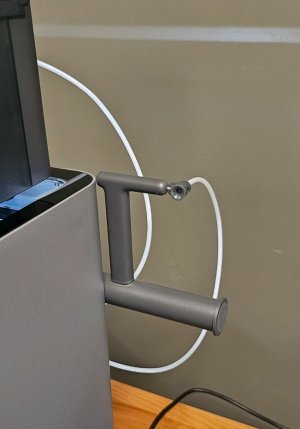
Another quick question. Now that I know that those tubes are just filament guides, is there a reason I can't remove the manual spool holder?

20260703_130127.jpg

I can't really imagine needing it and it looks like a Susquatch trap. It gives me the heevie jeevies. I'm gunna get it caught in something and either break it or break something else.
 
It's magnetic, and pops right off....it's designed to flex, just don't get too squatchy with it......

That's a real risk....

I was working on an impliment hookup a while back and my wife happened to be there. It wouldn't quite go so I wound up and stomped on it. My wife just about fainted. She had never seen me get violent before.

I bought a spare with the printer. I'll check it out first.
 
Back
Top