
-
Scam Alert. Members are reminded to NOT send money to buy anything. Don't buy things remote and have it shipped - go get it yourself, pay in person, and take your equipment with you. Scammers have burned people on this forum. Urgency, secrecy, excuses, selling for friend, newish members, FUD, are RED FLAGS. A video conference call is not adequate assurance. Face to face interactions are required. Please report suspicions to the forum admins. Stay Safe - anyone can get scammed.
-
The 2026 Calgary Area Meetup is set for Saturday May 30th at 10am. The signup thread is here! Robinhood has graciously offered to host the meetup again this year. Please note that you MUST RSVP to the notice linked above if you wish to come.
You are using an out of date browser. It may not display this or other websites correctly.
You should upgrade or use an alternative browser.
You should upgrade or use an alternative browser.
3D Printer Happened
- Thread starter Susquatch
- Start date
historicalarms
Ultra Member
Or Craig could use "Marine Corp improvisation" ...I needed 2 black plastic knobs for the drill handles that were missing when I received it, for my "new to me mill". I was going to ask the forum 3D guys if one could print a couple for me and then "the light came on" that I had a few hardwood round balls left over from 1 5/8 bore cannon ammo...drilled an appropriate size hole 3/4"deep and gasket glued then on...worked perfect no 3D required.Please define useful.....
Did you look for a bedside table holder for your teeth?
How about a TV Remote stand?
A toilet paper dispenser?
A tablet/phone stand for the shop?
A flower vase for one rose to say I'm sorry with?
A pocket pill box for your valium?
Bolt sorter with posts to identify nuts and holes for screws?
Tell us what your last home rant was. After we laugh at you, maybe we can help you avoid another one.
As I have waded into this topic with all of you I realize that my problem is the same problem that I had with my converted TOS FN20 milling machine to CNC. How to draw something and make a G code file to produce the part. In discussion with A.I. and this form, it is apparent for what I want to do I need a 3D scanner. With this tool, https://store.creality.com/ca/produ...DJ80Tug-sG9dpeI_Bj7-qLckfuLprUVkXqsY02jPcOgYk
3D printing and metal work can now be something to expand my needs. 3D printing is now and extension of 3D metal working that I have struggled with. This may be the solution.
As another member has stated, he doesn't think he will get much use out of a 3D printer and I from my own perspective I would have to agree. But now I see things from another light ( so to speak ) and I can see options and ideas being possible. If you had followed my door repair post where I took molds of the door, made a punch and die milled from aluminum then clamped the two together to remove a door ding. Making the punch and die took me days by traditional methods. 3D scanning would allow me to do the same work in hours and the punch and die could be made from hard plastic to remove the dent.
I see possibilities.
TonyK.
Grimsby Ontario Canada.
3D printing and metal work can now be something to expand my needs. 3D printing is now and extension of 3D metal working that I have struggled with. This may be the solution.
As another member has stated, he doesn't think he will get much use out of a 3D printer and I from my own perspective I would have to agree. But now I see things from another light ( so to speak ) and I can see options and ideas being possible. If you had followed my door repair post where I took molds of the door, made a punch and die milled from aluminum then clamped the two together to remove a door ding. Making the punch and die took me days by traditional methods. 3D scanning would allow me to do the same work in hours and the punch and die could be made from hard plastic to remove the dent.
I see possibilities.
TonyK.
Grimsby Ontario Canada.

pdentrem
Ultra Member
It is surprising how many items one starts to make using a 3d printer that I would have made out wood or metals or ended up buying.
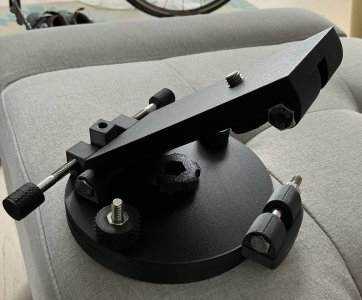
This is an equatorial wedge for a small telescope.
This is a storage contrainer for filters.
P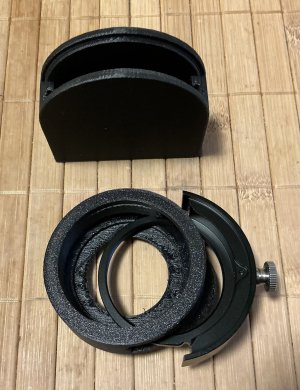
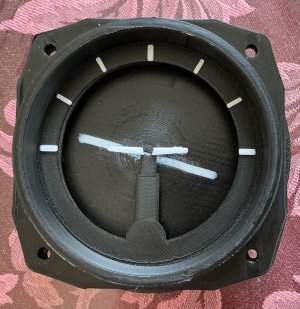
The making of a aircraft instrument for a display
Pierre
This is an equatorial wedge for a small telescope.
This is a storage contrainer for filters.
P
The making of a aircraft instrument for a display
Pierre

trlvn
Ultra Member
At least for testing, a separate 3D scanner may not be necessary? Certain smartphones include a "LiDAR" scanner (Light Detection And Ranging). All of the iPhone Pro models have had LiDAR for several years and I believe higher-end Android phones do too. If you have such a phone--or know someone who does--you can have a go at 3D scanning with a free app. There are lots of blog postings and videos on the web with step-by-step instructions.
Hopefully, having a little hands-on experience will help decide if you want to shell out real cash for a dedicated scanner.
Craig
(I guess I'm 'LiDAR-curious' but I don't have a iPhone Pro. Need to check what model my daughter bought recently!)
Hopefully, having a little hands-on experience will help decide if you want to shell out real cash for a dedicated scanner.
Craig
(I guess I'm 'LiDAR-curious' but I don't have a iPhone Pro. Need to check what model my daughter bought recently!)

Tobho Mott
Ultra Member
I read that 3d models made using 3D scanners might need a bunch of massaging to turn into a usable 3d printer file. It's been a few years since I looked into it though. Maybe it's not that big of a deal.
Jeff
Jeff

It is a lot better as you can run it through the specific AI's now to clean it up. Even some of the slicers do a decent job of fixing the models. Its not fool proof but it is coming along. Base 3d scanners are getting cheaper in each generation. Scanners are below 1k now.I read that 3d models made using 3D scanners might need a bunch of massaging to turn into a usable 3d printer file. It's been a few years since I looked into it though. Maybe it's not that big of a deal.
Jeff
It is a lot better as you can run it through the specific AI's now to clean it up. Even some of the slicers do a decent job of fixing the models. Its not fool proof but it is coming along. Base 3d scanners are getting cheaper in each generation. Scanners are below 1k now.
In my research the scan file needs to be tweaked in either Autodesk Fusion or Free CAD. All of this sound doable. More reading still to do.I read that 3d models made using 3D scanners might need a bunch of massaging to turn into a usable 3d printer file. It's been a few years since I looked into it though. Maybe it's not that big of a deal.
Jeff
TonyK.
Grimsby Ontario Canada.
I have to admit that this thread and posts have gotten me thinking of why I have avoided 3D printing. Even my son and daughter find it difficult that I have not entered into this realm of making STUFF. I can confess that the complexity at times has me fearful and as I read through all of this material the limitations not only of myself but of the whole concept required study. With that concluded somewhat, I realize that I either need to be good at CAD drawing, or I need a work around. Susquatch mentioned that one of us should get a 3D scanner and looking into the matter for what I want to do, what I have been doing and could be doing a scanner makes sense. In consulting with and I want anyone using A.I. that is all it is a consultation as A.I. trips constantly over it's own digital feet. As scanners go some smart phone are up to the task, but in a limited capacity. Some scanners cannot look at anything that is the least bit glossy and require the item to be scanned to be sprayed to dull the reflectance of the scan lighting. Then we get into resolution of not only the surface but pocket depth. To be honest, what is the point of scanning if the scan is not accurate and then also realize that there is some manipulation afterward in software programs required to make adjustments so that the part or item scanned appears to be correct and not distorted.
As I read and read and ask question and read some more, it appears that 3D printing is a complicated package and although the printing of a part maybe simple from a known good file, making a file from a scan presents hardware difficulty. One entering into that arena will find there is still a lot to consider. Scanner resolution, what size of an object can be printed and lastly A.I. never mentioned this until I woke up in the middle of the night, what computer is needed to operate a scanner.
Want a bigger printing area, distortion comes into play and a heated print chamber should be on the list of the printer you need to purchase. How much power does a heated chamber printer require, well... 1200 watts. We need a separate circuit for the printer. Venting, it is recommended that if printing indoors that a power vent be installed to vent fumes from the printer out doors.
So if I were to take the plunge to meet my needs as I see them with the added bonus of making a scanned part and generating a G code file for my TOS FN20 CNC milling machine it runs on the wish list of the following.
The Fixed All-Creality $4,000 CAD Budget Breakdown
By keeping both fabrication tools within the Creality ecosystem, everything utilizes the exact same native software package with lifetime-free licenses and updates. There are no surprise import duties or recurring operational fees. [1, 2, 3]
[TR]
[th]Hardware Component[/th][th]Exactly What You Are Getting[/th][th]Exact Cost (CAD)[/th][th]Sourcing[/th]
[/TR]
[TR]
[td]Creality Raptor Pro 3D Scanner[/td][td]22-blue laser handheld metrology scanner with custom hard travel case, calibration board, and USB cords.[/td][td]$1,973.06[/td][td]Direct from Creality CA Store (Using code
[/TR]
[TR]
[td]Creality K2 Plus Combo 3D Printer[/td][td]Flagship 350 mm³ enclosed industrial printer with its actively heated 60°C chamber and the CFS multi-material dry box.[/td][td]$1,503.06[/td][td]Direct from Creality CA Store (Using code
[/TR]
[TR]
[td]Used Gaming Laptop[/td][td]A dedicated, portable processing machine with an Nvidia RTX graphics card and 16GB/32GB RAM.[/td][td]~$500.00[/td][td]Local Classifieds (Facebook Marketplace, Kijiji, etc.)[/td]
[/TR]
[TR]
[td]Total Project Ecosystem[/td][td]Your complete hardware and computer setup.[/td][td]$3,976.12[/td][td]Strictly under the $4,000 CAD target limit.[/td]
[/TR]
For now I will think a lot about this leap. Possibly closer to fall or to Christmas I will jump into this.
It has possibilities which can be limitless, but in the age of rapid moving technologies all of this can be outdated in 1 year or less. I suppose I can say I will never be with the times.
TonyK.
Grimsby Ontario Canada.
As I read and read and ask question and read some more, it appears that 3D printing is a complicated package and although the printing of a part maybe simple from a known good file, making a file from a scan presents hardware difficulty. One entering into that arena will find there is still a lot to consider. Scanner resolution, what size of an object can be printed and lastly A.I. never mentioned this until I woke up in the middle of the night, what computer is needed to operate a scanner.
Want a bigger printing area, distortion comes into play and a heated print chamber should be on the list of the printer you need to purchase. How much power does a heated chamber printer require, well... 1200 watts. We need a separate circuit for the printer. Venting, it is recommended that if printing indoors that a power vent be installed to vent fumes from the printer out doors.
So if I were to take the plunge to meet my needs as I see them with the added bonus of making a scanned part and generating a G code file for my TOS FN20 CNC milling machine it runs on the wish list of the following.
The Fixed All-Creality $4,000 CAD Budget Breakdown
By keeping both fabrication tools within the Creality ecosystem, everything utilizes the exact same native software package with lifetime-free licenses and updates. There are no surprise import duties or recurring operational fees. [1, 2, 3]
[th]Hardware Component[/th][th]Exactly What You Are Getting[/th][th]Exact Cost (CAD)[/th][th]Sourcing[/th]
[/TR]
[TR]
[td]Creality Raptor Pro 3D Scanner[/td][td]22-blue laser handheld metrology scanner with custom hard travel case, calibration board, and USB cords.[/td][td]$1,973.06[/td][td]Direct from Creality CA Store (Using code
CRCA06)[/td][/TR]
[TR]
[td]Creality K2 Plus Combo 3D Printer[/td][td]Flagship 350 mm³ enclosed industrial printer with its actively heated 60°C chamber and the CFS multi-material dry box.[/td][td]$1,503.06[/td][td]Direct from Creality CA Store (Using code
CRCA06)[/td][/TR]
[TR]
[td]Used Gaming Laptop[/td][td]A dedicated, portable processing machine with an Nvidia RTX graphics card and 16GB/32GB RAM.[/td][td]~$500.00[/td][td]Local Classifieds (Facebook Marketplace, Kijiji, etc.)[/td]
[/TR]
[TR]
[td]Total Project Ecosystem[/td][td]Your complete hardware and computer setup.[/td][td]$3,976.12[/td][td]Strictly under the $4,000 CAD target limit.[/td]
[/TR]
For now I will think a lot about this leap. Possibly closer to fall or to Christmas I will jump into this.
It has possibilities which can be limitless, but in the age of rapid moving technologies all of this can be outdated in 1 year or less. I suppose I can say I will never be with the times.
TonyK.
Grimsby Ontario Canada.
Hi Tony grab a K2plus combo on sale they can be had for around 1700 on sale. I have had very minimal issues with mine. You will have issues with any printer when you run it for enough time. The k2plus has some nice features like auto belt tension. Bed level is pretty standard on all printers. I think just of the top of my head I would say close to 350+ kgs or more through mine. The 3d scanner I would sit on for now. Unless you have a specific need for one. You can use a cell that gas lidar in it to 3d scan. Cheap units are down to $600. They drop in price from now and then. There is an unreal amount of models to print. Use yeggi or STL finder. Finding models can be tough some times as people use all kinds of different ideas on naming models. So do some deep dives and generally you will find a model that works it can be modified. I use tinkercad all the time. Fusion can be had free, freecad, lots of others. I am on my 6th printer and can not think of not having one. Jigs, hangers, hooks, models, cosplay, car parts, drywall backing boards, fittings for my irrigation pump, this is in the last couple months. Latest project plasma CNC 3d printed parts, using old 3d printers parts, steppers, pom wheels. The options are endless.

My only comment on this is that scanning and turning that into drawings that can be printed is a whole other world.
It's the kind of pit one could fall into using it to create a drawing from a set of photos when doing the drawing from scratch is faster.
But I do maintain if you want to 3D print more than just what is available free off the net then CAD is a must. Scanning not. But CAD parametric type 3D drawings that turn into STL files is a must.
It's the kind of pit one could fall into using it to create a drawing from a set of photos when doing the drawing from scratch is faster.
But I do maintain if you want to 3D print more than just what is available free off the net then CAD is a must. Scanning not. But CAD parametric type 3D drawings that turn into STL files is a must.

Susquatch mentioned that one of us should get a 3D scanner and looking into the matter for what I want to do, what I have been doing and could be doing a scanner makes sense. In consulting with and I want anyone using A.I. that is all it is a consultation as A.I. trips constantly over it's own digital feet. As scanners go some smart phone are up to the task, but in a limited capacity. Some scanners cannot look at anything that is the least bit glossy and require the item to be scanned to be sprayed to dull the reflectance of the scan lighting.
I am on quasi-vaca now going home this morning. But I've had some time to look into scanners of various types. I'm at almost the same place as you Tony. Without repeating most of what you have said, suffice to say that a scanner isn't happening for me.
I have more or less concluded that CAD will be required for almost anything I want to do - with or without a scanner. Once upon a time I flew Catia. So I know I can learn another platform if I can just let go of my first love. She must die in my heart and mind before I can love another. I gotta stop comparing Fusion or whatever to my old love and just move on.
So that's it for me Tony. No scanner in my future, but CAD needs to happen. Sorry about that.
I think I'd like to cover that journey in another CAD thread elsewhere, but if you prefer I could do that here in my Bambu 3D Printer thread?
Possibly a new thread as this one was in regard to purchasing a 3D printer and making a huge leap. The next leap is the CAD which from past experience with CAM BAM difficult to the point that I rarely ever used it and have such difficulty in attempting do anything ever again with it.I am on quasi-vaca now going home this morning. But I've had some time to look into scanners of various types. I'm at almost the same place as you Tony. Without repeating most of what you have said, suffice to say that a scanner isn't happening for me.
I have more or less concluded that CAD will be required for almost anything I want to do - with or without a scanner. Once upon a time I flew Catia. So I know I can learn another platform if I can just let go of my first love. She must die in my heart and mind before I can love another. I gotta stop comparing Fusion or whatever to my old love and just move on.
So that's it for me Tony. No scanner in my future, but CAD needs to happen. Sorry about that.
I think I'd like to cover that journey in another CAD thread elsewhere, but if you prefer I could do that here in my Bambu 3D Printer thread?
For what I want to do, if I get the printer, then I need the scanner as well and will have to also learn CAD.
There was hope, now I face work and a lot of leaning.
All the best.
TonyK.
Grimsby Ontario Canada.

Having used a large number of CAM programs I can tell you that CAMBam is one of the least intuitive applications I've ever used. Its workflow is clunky and difficult to use.Possibly a new thread as this one was in regard to purchasing a 3D printer and making a huge leap. The next leap is the CAD which from past experience with CAM BAM difficult to the point that I rarely ever used it and have such difficulty in attempting do anything ever again with it.
For what I want to do, if I get the printer, then I need the scanner as well and will have to also learn CAD.
There was hope, now I face work and a lot of leaning.
All the best.
TonyK.
Grimsby Ontario Canada.
If you need to do 3D toolpaths you will need a modern CAM program. FreeCAD 1.1.1 has come leaps and bounds and is my go-to over Fusion.
FreeCAD 1.1.1 has come leaps and bounds and is my go-to over Fusion.
Really!
I thought your CAD of choice was Alibre! Where did I fall off the train?
You've got to remember he repairs "Audi's" rather than recycling them..Really!
I thought your CAD of choice was Alibre! Where did I fall off the train?
Sorry I was unclear there...Really!
I thought your CAD of choice was Alibre! Where did I fall off the train?
I use Alibre for drawing but use FreeCAD for its CAM workbench since I cannot find a CAM package that I like that doesn't cost a zillion dollars.
Alibre used to have MecSoft as a partner but that imploded and so went their partnership which is too bad because I like the Mecsoft product.
Alibre is now partnered with EZ-Cam. I tried to use EZ-Cam and found it anything but easy.
Tried EstlCAM and it has promise for 2D and 2.5D work but I haven't spend enough time to really sort it out.
Tried BoBCAD and it was nice but the price-tag was prohibitive for me.
Tried SolidEdge and SolidCAM since I actually like SolidEdge. I spent about four hours trying to get SolidEdge and SolidCAM to work on my PC and had nothing but problems. Which is really too bad as SolidCAM has all of the CAM options I want.
V1.0 of FreeCAD was a quantum leap forward. One problem they solved was sketching on faces vs datum planes. On V0.X sketching on faces was a recipe for breaking the model but that has been changed in V1.X as it now allows the industry stand sketch on face action.
I am trying to use FreeCAD more and more though as I like its open source community ethos vs. locked down corporate applications.
I know that heaps of people say just use Fusion but something about Fusion rubs me the wrong way.

Golem Pens
Michael
Another vote for Free as. Not that I've done a huge amount with it.

While I use F360 for almost everything, I installed FreeCAD on a Linux system for access to the Abaqus FEA solver. The Fusion solver is limited to only elastic statics - so no modal analysis, large displacement or plastic deformation.Sorry I was unclear there...
I use Alibre for drawing but use FreeCAD for its CAM workbench since I cannot find a CAM package that I like that doesn't cost a zillion dollars.
Alibre used to have MecSoft as a partner but that imploded and so went their partnership which is too bad because I like the Mecsoft product.
Alibre is now partnered with EZ-Cam. I tried to use EZ-Cam and found it anything but easy.
Tried EstlCAM and it has promise for 2D and 2.5D work but I haven't spend enough time to really sort it out.
Tried BoBCAD and it was nice but the price-tag was prohibitive for me.
Tried SolidEdge and SolidCAM since I actually like SolidEdge. I spent about four hours trying to get SolidEdge and SolidCAM to work on my PC and had nothing but problems. Which is really too bad as SolidCAM has all of the CAM options I want.
V1.0 of FreeCAD was a quantum leap forward. One problem they solved was sketching on faces vs datum planes. On V0.X sketching on faces was a recipe for breaking the model but that has been changed in V1.X as it now allows the industry stand sketch on face action.
I am trying to use FreeCAD more and more though as I like its open source community ethos vs. locked down corporate applications.
I know that heaps of people say just use Fusion but something about Fusion rubs me the wrong way.
On the other hand, FreeCAD has a very effective mesh and solver workspace which does all of these calculations and it costs zero beans.
I was initially concerned about performance with a large (8000 node) model - but the solver time for statics was around 6 seconds on a i9 3.8GHz machine!!!!! That is really fast - quicker than F360 solving in the 'cloud'.
I think FreeCAD offers the 'new to cAD' user a very useful and reasonably intuitive platform, and you cant beat the price.
🙂