• Scam Alert. Members are reminded to NOT send money to buy anything. Don't buy things remote and have it shipped - go get it yourself, pay in person, and take your equipment with you. Scammers have burned people on this forum. Urgency, secrecy, excuses, selling for friend, newish members, FUD, are RED FLAGS. A video conference call is not adequate assurance. Face to face interactions are required. Please report suspicions to the forum admins. Stay Safe - anyone can get scammed.
  • The 2026 Calgary Area Meetup is set for Saturday May 30th at 10am. The signup thread is here! Robinhood has graciously offered to host the meetup again this year. Please note that you MUST RSVP to the notice linked above if you wish to come.

Virtual Graph Paper

TorontoBuilder

Sapientia et Doctrina Stabilitas
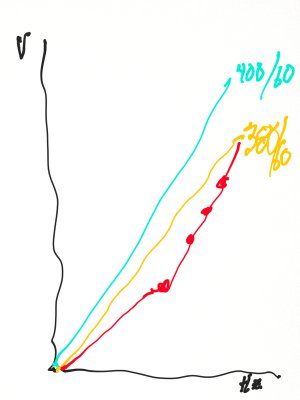
I used to use excel daily, and I could whip up any graph with ease.

Sheets is a little different and I can't easily get the results I want. Although I was able to duplicate what I'd done by hand, but it took me 3 times longer.
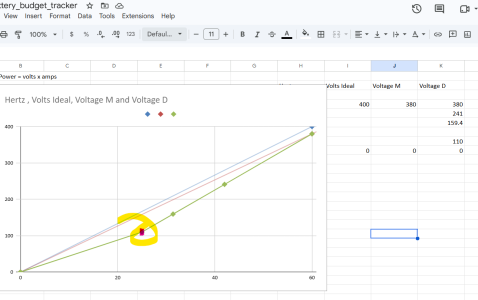
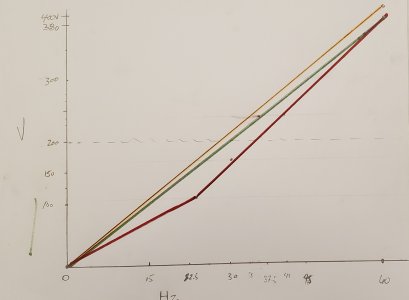

1790649739174.png


1790649922323.jpeg


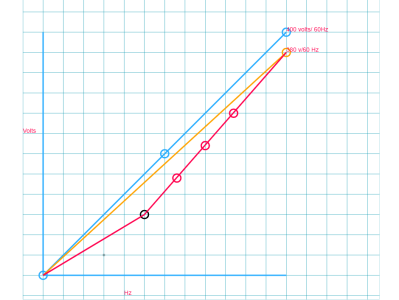
So I kept looking, and found Virtual Graph Paper. But I think I saw it posted here before...

I think it would be easier to add labels with snipping tool... fast but clunky... hard to place data points.

I think I'll try to master sheets.
1790650240361.png
 
I just use Sheets because thats what Gemini spits out to. But my brain is so hardwired to years of Excel if I have to do anything more than 2 seconds of work in Sheets or figure out what command/icon they copied badly, I just paste it into Excel. Whenever I upgrade this PC its bye-bye Office 2019, but my laptop is already on 365 personal which gives 5 concurent seats for 115CAD/year with 1TB cloud storage. I hate subscriptions but its the moneygrubbing way. 365 is probably what I'll be writing my memoirs & spreadsheeting my depleting retirement fortune sh*tting my pants in an elderly happy home. Yes I've seen the Linux stuff. Its similar but different & not sure about macros/VBA Anyway, Old Dog <> New Tricks
 
I'm also hardwired for excel at this point. Other options are perfectly fine for most of what I do, I'm just not used to them.

I bought a standalone copy of excel (I think 2019) that's tied to my Microsoft account. Perpetual license, I can transfer it between computers, but only on 1 computer at a time. I use LibreOffice for everything else. Unfortunately, I don't think they offer a perpetual excel license anymore.
 
Unfortunately, I don't think they offer a perpetual excel license anymore.
They do, looks like Office 2024 was last release. The release cycles arent every year though so probably why no Office 2026 if thats what you mean. MS heavily pushes 365, subscription revenue is like monetary oxygen which is why its so common in many commercial apps. Even large corps buy enterpise versions of 365. Actually there are a lot of new, powerful features in 365 Excel that are not present in older versions which are very desireable depending on what you do for data crunching, data crunching, data acquistion, cross platform sharing... But some apps that utilize Excel more or less as a plug-in utility (CAD design tables as example) had a history of not always playing nice with 365, so pays to check.

OpenSource apps are a different animal of course. Sometimes it fits a persons needs perfectly & bless the hardworking developers behind the scenes. And sometimes its not a good fit or the app is clunky. Best you can do is take it for a test drive & decide on your own.
 
Yes thats another option. I've always required Word & PowerPoint for work related alignment. I seem to recall 2019 Office bundle including Outlook was ~ $250 & Excel standalone was like $140 or so.
In fact prior to v2019 I could get a full Office licence for something insane like $25. But when connectivity was well established, MS they yanked that perk.
 
You can still get "grey market" Microsoft office keys that are purportedly meant for cheaper markets or OEMs but end up getting sold here. $25 is pretty common for one of those.
 
Back
Top