• Scam Alert. Members are reminded to NOT send money to buy anything. Don't buy things remote and have it shipped - go get it yourself, pay in person, and take your equipment with you. Scammers have burned people on this forum. Urgency, secrecy, excuses, selling for friend, newish members, FUD, are RED FLAGS. A video conference call is not adequate assurance. Face to face interactions are required. Please report suspicions to the forum admins. Stay Safe - anyone can get scammed.

Winblows 10 laptop missing network issue

JustaDB

Ultra Member
Have a laptop running Win 10. Took it to the cabin last summer & when i clicked on the wifi icon, the cabin network wouldn't show. No biggie, I surfed using my lovely bride's tablet. It was the only network I haven't been able to find.

We just upgraded our Robber's router at home tonite, the brand new, shiny network doesn't show up in the list on the laptop, so I can't connect directly to wifi. Robber's tech support was no help (quelle surprise...)

Thoughts? Win 11 is not an option.
 
Do any networks show?

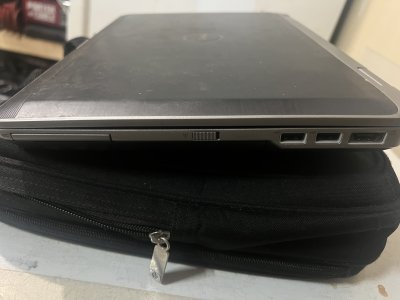
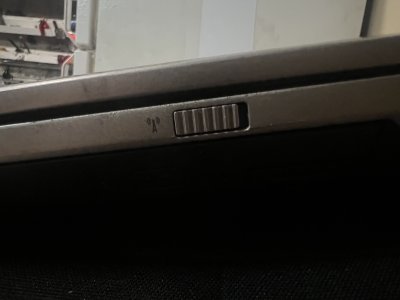
I ask because my old laptop would do this once and awhile and show no networks. Turned out sometimes when picking up the lap top, the manufacturer (will look at it in a bit when I go to the basement) put a network on/off switch on the side of the laptop... stupidest thing id ever seen in a stupidest place ever lol

I'll take a pic of it when I look
 
this stuff is perfect AI. Vs search it is interactive, will have you run tests, listen to your explanation etc.... apologies if singing to choir but it is by far the best way to come at IT problems in my view
 
Do any networks show?

I ask because my old laptop would do this once and awhile and show no networks. Turned out sometimes when picking up the lap top, the manufacturer (will look at it in a bit when I go to the basement) put a network on/off switch on the side of the laptop... stupidest thing id ever seen in a stupidest place ever lol

I'll take a pic of it when I look
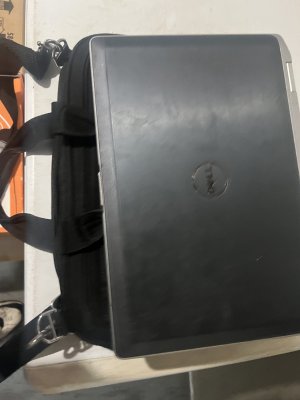
Here are the pix of my old craptop and network switch in a stupid spot…
 

Attachments

  • IMG_8133.jpeg
    IMG_8133.jpeg
    1.3 MB · Views: 3
  • IMG_8135.jpeg
    IMG_8135.jpeg
    1.9 MB · Views: 3
  • IMG_8134.jpeg
    IMG_8134.jpeg
    1 MB · Views: 3
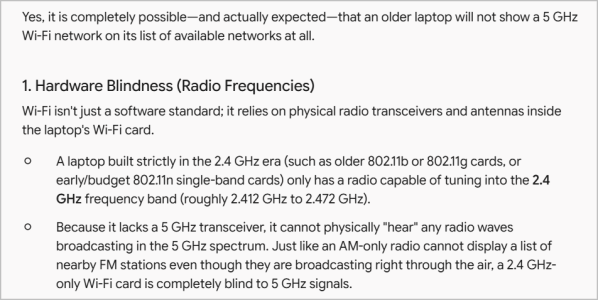
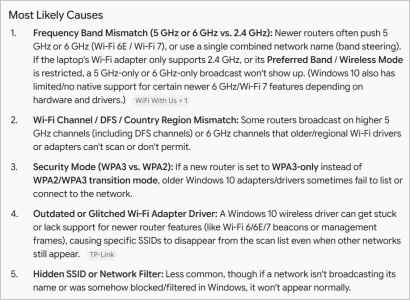
Possible that the laptop only supports 2.4 ghz wifi and the network you can't see is only broadcasting 5 ghz.

Point-1 of post #2. Its not clear in the thread when the 'new' router(s) entered the mix, but the combination of 5-GHZ router + 2.4-GHZ card means the laptop potentially cant see it. If so, nothing to do with OS.
OP never really expanded if laptop is seeing ANY networks (notably older 2.4). But if you expand the post #2 Gemini link, the OS can definately have a say in this even if the card is capable.

1795110948002.png
 
Unrelated but just FYI, when I upgraded my Rogers/Shaw router it came as 5-GHZ. Great for pumping to the TV. Not great for many ancillary devices that require 2.4 - printers, scanners, camera door bells, alarm-systems... In my case I had to configure/enable a 2.4 split band, I think they call it band steering. So this makes a different dedicated 2.4 SSID & the 2.4 devices have to point to that SSID.
Now here I am on shakey ground but I think its possible to get a router box that is not configuarble to 2.4, just 5.0+ Now is this a function of the box hardware or telecom provider...???
 
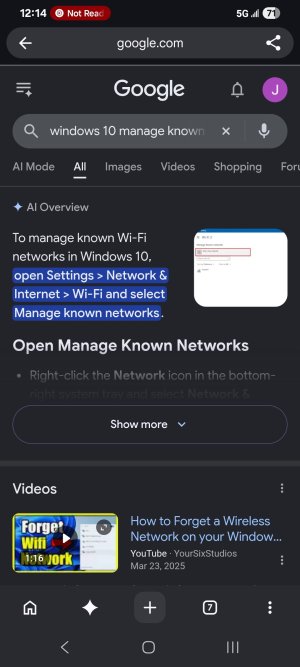
Have had this happen before if there is too many saved networks in the list.
Go into manage known networks and delete whatever you no longer wish to have saved.
Restart laptop and try again
 

Attachments

  • Screenshot_20261119_121456_Chrome Beta.jpg
    Screenshot_20261119_121456_Chrome Beta.jpg
    202.2 KB · Views: 3
Back
Top