• Scam Alert. Members are reminded to NOT send money to buy anything. Don't buy things remote and have it shipped - go get it yourself, pay in person, and take your equipment with you. Scammers have burned people on this forum. Urgency, secrecy, excuses, selling for friend, newish members, FUD, are RED FLAGS. A video conference call is not adequate assurance. Face to face interactions are required. Please report suspicions to the forum admins. Stay Safe - anyone can get scammed.
  • The 2026 Calgary Area Meetup is set for Saturday May 30th at 10am. The signup thread is here! Robinhood has graciously offered to host the meetup again this year. Please note that you MUST RSVP to the notice linked above if you wish to come.

Space mouse anyone?

a lot more fine control is required to make the object dance smoothly.
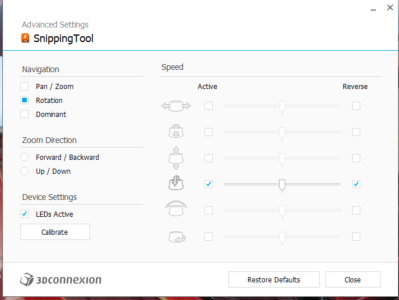
You can tune down the "speed" to help with that. I find some programs are far faster by default and need the settings slowed down, others are too slow and need it faster. Seems the little 3Dconnexion app is too smart for me - it autoswitched to "snipping tool" from Fusion as soon as I opened the snipping tool to grab a screen shot...
1758852574378.png
 
F360 view positioning is easy and reasonably intuitive, but its like a learner driver janking the clutch
I find I’m so used to using my space mouse that I won’t play with Fusion unless I have it.

Moving the view has become so second nature to me that I don’t even bother viewing things straight down, even when sketching.

I got one of the wireless space mouses that have the wrist support. I don’t ever use the buttons, since if I don’t use Fusion for a month then I forget which button has been assigned to which button.

Once you’re use to it, try rotating it so the cord is at 90 degrees to where you normally have it. That almost hurts my brain…

(BTW- the latest version of Fusion allows you to use the space bar to repeat a command- just like AutoCAD does. You do have to “finish” a command though, so it’s not that earth shattering when you can right mouse click and select the last command…)
 
I've been looking at these 3D mice for view manipulation with F360, Blender, etc.
View attachment 70517
Is anyone else using these or similar as a left hand control? Do you like it? Would you recommend one?

I'm wondering if the $300 is going to make enough of a difference to the workflow and the the arthritis to justify it.

🙂
I may be a little late with my response. I do own and use this exact Wireless SpaceMouse and use it with Fusion 360. I like it VERY much and would highly recommend it. I will warn you that it took me about 10 to 20 hours over a couple of weeks of use for its operation to become familiar. $300 is a lot, and a person could likely do OK on simpler models but for any model with numerous 'components' I see it as a game changer. Now that I have the hang of it I don't think I would want to go back.
 
I'm late to the party on this one, but in case anyone else is thinking of one I thought I would pipe in. I've used them for a VERY long time while I was still working (retired now), and I have one at home that I use with both Fusion and Solidworks. Can't live without it, frankly.
 
Even later to the party, here.

I've never used one of these but definitely considered it when some design projects have gotten 'intense' in the past. I always looked at prices and thought "naw, I can get away without it". I've used Inventor and FreeCAD with a thumb-trackball (I would not recommend it, even if you are used to one of these). a standard mouse and a vertical mouse. I've become pretty confident with keyboard shortcuts and the vertical mouse (this is something I don't think I could ever go back to a standard mouse from for any part of my computer work). But still... I am intrigued by the thought of an easier way to manipulate the 3d viewport, especially when assemblies get complex. I may just take a closer look at that DIY one on GitHub and give it a whirl when electronics 'season' comes back around.
 
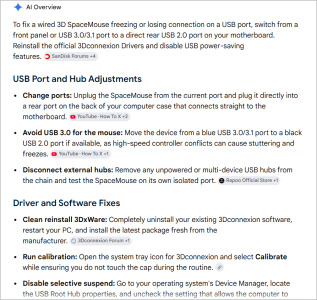
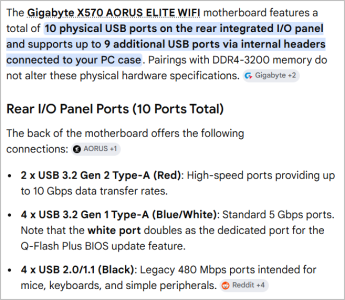
I have been happy with mine (wired not wireless). On #2 now because I wore #1 button/scroll wheel out after years of daily grinding. I had one glitch after ~3 year mark where I was ready to order another or look elsewhere thinking QC was slipping. There is nothing quite so frustrating is having your PC boot up & you literally can do very little without a mouse. I think I tried plugging in a USB wireless dongle from a spare laptop mouse but it wasnt recognizing it. Turns out swapping the USB to another port (both on backside/motherboard) did the trick. Why it worked so long & didnt I cant explain. I should really take the time to figure out what port is what for future reference.

1785081882940.png
 
Why it worked so long & didnt I cant explain. I should really take the time to figure out what port is what for future reference.
USB. I've always considered the U to stand for "Unreliable", not "Universal". The amount of time I've wasted in my life fighting with USB being shady is ridiculous (and not jus the only getting it plugged in correctly on the third try, either). I don't remember ever having this sort of irregularity with PS/2 and serial ports (just had to make sure it was plugged in before you booted up).

The inconvenience we suffer in the name of convenience...
 
I’ve never really given it much thought I’ve just flipped it over, if I was really concerned about it I’d just put some nail polish or something to indicate this side/edge up.
 
I’ve never really given it much thought I’ve just flipped it over, if I was really concerned about it I’d just put some nail polish or something to indicate this side/edge up.
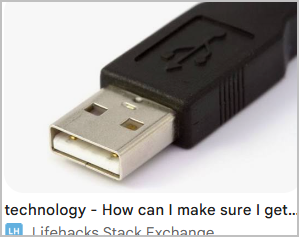
For the most part, the end with the USB logo or symbol will be the up side.
 
For the most part, the end with the USB logo or symbol will be the up side.

Not sure thats reliable either. I usually look at the plastic thingy in the plug, goes opposite the plastic thingy in the socket. None of which does you much good when the plug is on the back of the computer

1785212418434.png1785212445735.png

why dont they just..... oh wait, they have. More now-redundant hardware. We cant wear them out as fast as new standards arrive. And lets not even bring up Apple
1785212771666.png
 
I have been happy with mine (wired not wireless). On #2 now because I wore #1 button/scroll wheel out after years of daily grinding. I had one glitch after ~3 year mark where I was ready to order another or look elsewhere thinking QC was slipping. There is nothing quite so frustrating is having your PC boot up & you literally can do very little without a mouse. I think I tried plugging in a USB wireless dongle from a spare laptop mouse but it wasnt recognizing it. Turns out swapping the USB to another port (both on backside/motherboard) did the trick. Why it worked so long & didnt I cant explain. I should really take the time to figure out what port is what for future reference.

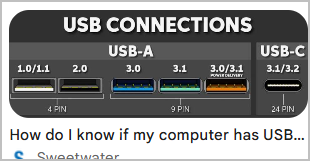
Was it a USB 3 port? If port works otherwise than it's likely interference with USB wireless adapters.


Avoid the blue/green/orange ports.
 
Was it a USB 3 port? If port works otherwise than it's likely interference with USB wireless adapters.

Could have been. I have many ports. But this is a direct wired mouse version, not wireless. I didnt think wired cared. When I plugged something else into the same port it seemed to work. I should have pursued it further but once the mouse was functioning again I moved on. I've never gotten along with wireless mouse for CAD on my main PC. Also some micro latency or other issues. Maybe a function of my PC desk layout because wireless seems to work smooth on my laptop. But I also don't CAD on my laptop so never really compared apples to apples. I used to say gamers shared my experience but I think thats now old news, lots of wireless in demanding environments.

1785252619362.png
 
Could have been. I have many ports. But this is a direct wired mouse version, not wireless. I didnt think wired cared. When I plugged something else into the same port it seemed to work. I should have pursued it further but once the mouse was functioning again I moved on. I've never gotten along with wireless mouse for CAD on my main PC. Also some micro latency or other issues. Maybe a function of my PC desk layout because wireless seems to work smooth on my laptop. But I also don't CAD on my laptop so never really compared apples to apples. I used to say gamers shared my experience but I think thats now old news, lots of wireless in demanding environments.

View attachment 84852

I have the X670 Aorus Elite AX for one of my PCs. I have better luck with hooking up wired/wireless devices into the USB 2 ports.

Usually this stuff can be resolved by updating to the most recent stable bios. If you have a legacy pointing device may have to look for manufacturer driver, or even conflicting drivers.

Latency is a real thing, and gaming mouses for sure manufacturer 0ms devices with high polling rates. If it feels better on laptop than PC, your PC monitor may also contribute to any perceived latency. Typically, "gaming" monitors are both high refresh rate and low latency compared to "office" oriented monitors.

But if it all works satisfactory now maybe not even worth pursuing.
 
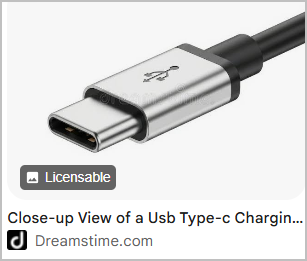
USB-C could have been a winner if they hadn't started dicking around with cords that deliver data but no power, or power but no data, and making them indistinguishable from each other.

Either of those two options hit the trash at my house. I will not tolerate power only or data only. It's both or nothing.

I'm thinking of getting one of these.


Screenshot_20260728_201700_Amazon Shopping.jpg
 
I just assume all those free tiny USB-C cables that come with battery devices meant for charging are always going to be power-only. Likewise, any cables that come with data-device (not charging) like an external SSD enclosure will most likely be data only. Personally, I use those freebie cables only as intended with that type of device (power vs data) and consider them junk and not interchangeable. I have found the best freebie USB-C cables from premium monitors.

These days I am more concerned with power delivery (PD). The few times I bought USB cables was for desired length like 10ft or USB-C 100W to power my laptop. Otherwise, I haven't really found the need to pay attention to all the detail of each cable. I haven't used a data USB cable in forever since connecting all my devices together over ethernet/wireless network.
 
Back
Top