
-
Scam Alert. Members are reminded to NOT send money to buy anything. Don't buy things remote and have it shipped - go get it yourself, pay in person, and take your equipment with you. Scammers have burned people on this forum. Urgency, secrecy, excuses, selling for friend, newish members, FUD, are RED FLAGS. A video conference call is not adequate assurance. Face to face interactions are required. Please report suspicions to the forum admins. Stay Safe - anyone can get scammed.
-
The 2026 Calgary Area Meetup is set for Saturday May 30th at 10am. The signup thread is here! Robinhood has graciously offered to host the meetup again this year. Please note that you MUST RSVP to the notice linked above if you wish to come.
You are using an out of date browser. It may not display this or other websites correctly.
You should upgrade or use an alternative browser.
You should upgrade or use an alternative browser.
New CAM product on the block
- Thread starter DavidR8
- Start date

So I read it that it doesn't handle STL (mesh) the same way it handles STEP files - it requires STEP to be able to do automatic feature recognition. Too bad, would be amazing to skip the reverse engineering big $ software and have the CAM do feature recognition straight from a STL file (3D scan).

If I recall correctly FreeCAD does a reasonable job of STL to STP conversion plus it has a refine function which combines coplanar triangles into flat faces.So I read it that it doesn't handle STL (mesh) the same way it handles STEP files - it requires STEP to be able to do automatic feature recognition. Too bad, would be amazing to skip the reverse engineering big $ software and have the CAM do feature recognition straight from a STL file (3D scan).
Nothing stopping you from doing that.Lets say you already have a non Fusion 3D-CAD app of choice but no CAM. Why couldnt you output a STEP file & bring that into the free / low $ version of Fusion & just use the CAM side of it?
I just have an aversion to Autodesk.

gerritv
Gerrit
you can also sign up with a new email address and get 30 days access to the full capabilities. Great for when you just have to import a complex Solidworks model or generate some dxf's for plasma cutting.Lets say you already have a non Fusion 3D-CAD app of choice but no CAM. Why couldnt you output a STEP file & bring that into the free / low $ version of Fusion & just use the CAM side of it?

BaitMaster
Certified Redneck
I'm still in the learning phase but so far I'm impressed.Hey @DavidR8, how’s it working?
Does it do any flat work like plasma, laser, water jet?
How many projects have you done with it?
I can see it working for 2D stuff but you may have to fuss with the post processor to get the right code to signal torch start etc.
BaitMaster
Certified Redneck
If you come across anything good or bad, let us know. I might purchase before the half price expires.

pressure's on eh?If you come across anything good or bad, let us know. I might purchase before the half price expires.
BaitMaster
Certified Redneck
I’ve spent 270$ on stupider things. I also don’t like to be the first to do things. We’ll see. I’ll do more research.pressure's on eh?
My god no video’s on YouTube
Video Library — Takshak Hub
Walkthroughs, operation guides, and user cut logs for Takshak CAM.
 hub.takshakcam.com
trackwhack
New Member
Welcome George , please feel free to answer any questions.Dear All,
This is George from TakshakCAM. @DavidR8 , once again thank you for introducing us and for the kind words- we will be upgrading to the commercial license today so that I can make a detailed post.
In the meantime, if it is ok, I can answer some queries I saw here.
Kind Regards,
George
Hi George,Dear All,
This is George from TakshakCAM. @DavidR8 , once again thank you for introducing us and for the kind words- we will be upgrading to the commercial license today so that I can make a detailed post.
In the meantime, if it is ok, I can answer some queries I saw here.
Kind Regards,
George
I'm using the discontinued embedded AlibreCAM with AlibreCAD. The upside is I can move back and forth between the CAD and the CAM system and not lose all the CAM operations. AlibreCAM is a version of Mecsoft VisualCAM which is part of their VisualCAD/CAM package. Mine includes the 4th axis and I paid a lot over the years.
Needless to say I was disappointed to see it discontinued with the only option now to export a step file and import that into VisualCAM to get the same operations. But make one change in the drawing once you realize it would work better in CAM if it had that change and all the work is gone. The native AlibreCAD files didn't suffer from that issue.
I don't understand why the CAD suppliers don't make their drawing file format available so companies like yours can create integrated modules that work with the CAD. Perhaps you can explain that?
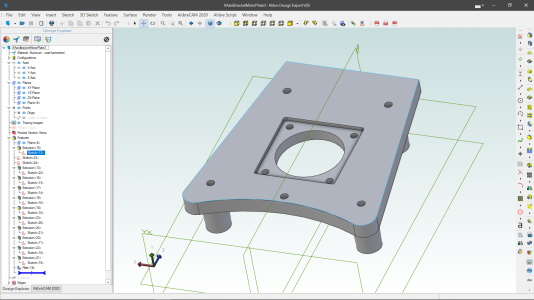
Here's an example of facing the back of a casting. Drawing is in AlibreCAD as shown by the tab on the bottom left corner.
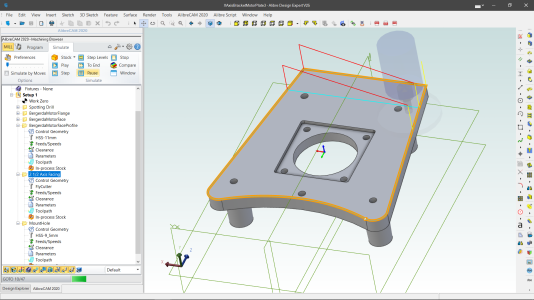
And here's the now selected AlibreCAM simulation with the flycutter doing the passes.
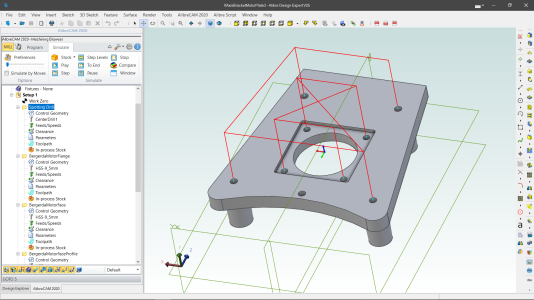
Here's the spotting drill for all the holes.
And the generated G-Code.
Code:
%
N1 G17 G20 G40 G90
( BEGIN TOOL LIST )
( TOOL 6 - CenterDrill1 - DESC: 12.0000 DIA, 2 FLUTE,  CARBIDE MAT )
( ENDOF TOOL LIST )
(Spotting Drill)
N2 T6 M06 G43
N3 S3000 M3
N4 G0 Z1.9685
N5 X-0.9744 Y0.9426
N6 G0 Z-0.0197 ( F0.9 )
N7 G81 X-0.9744 Y0.9426 Z-0.126 R-0.0197 F0.9
N8 G80
N9 G0 Z1.9685
N10 X0.9744
N11 G0 Z-0.0197 ( F0.9 )
N12 G81 X0.9744 Y0.9426 Z-0.126 R-0.0197 F0.9
N13 G80
N14 G0 Z1.9685
N15 X-0.9744 Y-1.0061
N16 G0 Z-0.0197 ( F0.9 )
N17 G81 X-0.9744 Y-1.0061 Z-0.126 R-0.0197 F0.9
N18 G80
N19 G0 Z1.9685
N20 X0.9744
N21 G0 Z-0.0197 ( F0.9 )
N22 G81 X0.9744 Y-1.0061 Z-0.126 R-0.0197 F0.9
N23 G80
N24 G0 Z1.9685
N25 X-2.2835 Y1.815
N26 G0 Z0.0984 ( F0.9 )
N27 G81 X-2.2835 Y1.815 Z-0.0079 R0.0984 F0.9
N28 G80
N29 G0 Z1.9685
N30 X2.2835
N31 G0 Z0.0984 ( F0.9 )
N32 G81 X2.2835 Y1.815 Z-0.0079 R0.0984 F0.9
N33 G80
N34 G0 Z1.9685
N35 X1.5354 Y-2.3189
N36 G0 Z0.0984 ( F0.9 )
N37 G81 X1.5354 Y-2.3189 Z-0.0079 R0.0984 F0.9
N38 G80
N39 G0 Z1.9685
N40 X-1.5354
N41 G0 Z0.0984 ( F0.9 )
N42 G81 X-1.5354 Y-2.3189 Z-0.0079 R0.0984 F0.9
N43 G80
N44 G0 Z1.9685
N45 T0 M06 G49
N46 M30
%
So although VisualCAD/CAM is more expensive usage is pretty easy and if I did have to drop down a level to use STEP files instead of native files why, other than price, would I use your software?