

thebric
New Member
Introduction
Earlier this summer, I bought a Standard Modern series 2000 with a D1-4 spindle. It came with almost every kind of workholding imaginable, including a huge Eclipse magnetic chuck. For whatever reason, the mag chuck had a D1-3 back plate on it. So that had to be fixed. I looked for a used backplate or a chuck cheap enough to repurpose and steal its plate. No luck.
So, my options were as follows:
I should have known that this would be a huge pain. Not just intuitively, but because a good friend of mine @mjautek already did this. If you’re thinking about making one of these for yourself, consider majutek’s post required reading. It’s excellent and full of good information.
Mjautek machined the backplate, but was able to scavenge some camlock pins. I was not able to find any pins, so I had to make them. My post will narrate my train of thought for measuring a D1-4 face plate I have, creating drawings, and the setup and machining of the pins based on the measurements and drawings. I'm no expert so I'm sure that in at least a few instances in this post, there's at least 1 better way to do what I did. Maybe with tools I don't have, or ideas I didn't think of. Comments are welcome.
But, I learned a lot while doing this and hopefully some of it ends up being useful to a few of you.
Measuring the camlock hole placement
First, let’s start with an incomplete drawing, then we’ll go over how I came to each of these measurements. This post will assume that you're familiar with how one of these chucks works. If you're not, Precision Matthews has published a good YouTube video on the subject. There are definitely other good videos out there.
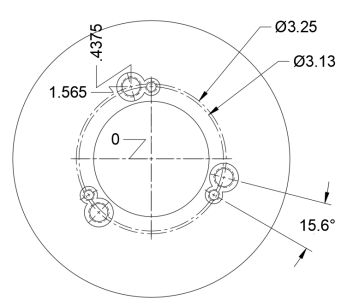
There are 3 identical sets of holes spaced equally around the centre of these back plates. In each set, the larger hole holds the camlock pin that attaches to the lathe’s spindle. The smaller hole is for a socket cap screw, which holds the camlock in place rotationally by a slot in the pin sized to match the screw head. Technically, this probably isn’t the only way to make these things, but I’ve never seen it done any other way. If you ever want your pins to be interchangeable, this is how it’s gotta be done.
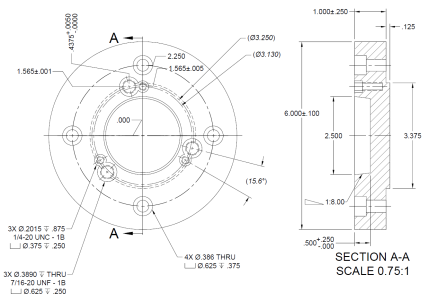
Important side note: The 15.6 degree dimension there is included for possible convenience. I suppose it’s possible that if someone’s mill and rotary table setup was weird enough, or at the extremities of axis travel, knowing that number would be the only good way to accurately position that hole. However, that number is driven by other features. We’ll see as we go on that this means (in this case,) that the ordinate dimensions of 0.4375” and 1.565” from centre for the pin hole, and 0” and 1.565” from centre for the cap screw hole, are based on the design of the part. The angle between the lines drawn between the centre and these two holes is a consequence of the other dimensions, nothing more.
PCD
First, let’s look at the PCD (pitch circle diameter) for the camlock pins. This is 3.25”. This fact is pretty well-documented, but let’s go through it anyways. I learned a thing or two here so maybe you will too.
To find this, I first measured the distance between two pins, from the outside. An important note: when you measure between two pins, you have to ensure that you’re measuring the shortest possible distance between them.
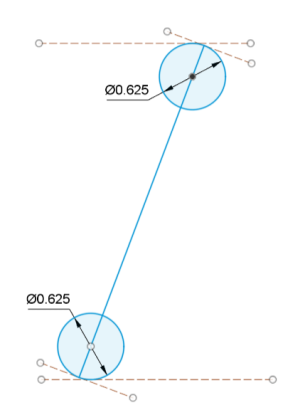
In the drawing above, the shortest possible distance between these two pins is the solid blue line. So, the jaws or anvils of your calipers or micrometers have to be perfectly perpendicular to that line to get a good measurement. Otherwise, you’re measuring the distance between the two long dotted orange lines. In reality, you’ll probably never be this far off without noticing. If you do measure it this way and you’re confident you’re pretty close, to find the PCD you’ll just divide that measurement by cos(30).
The reason we can do this is because a line drawn through one pin to the opposite side of the pitch circle (red, below), and the line made between two pins (light blue, below) are part of a right triangle, inscribed in the pitch circle. In the case of 3 pins, the angle between those 2 lines is 30 degrees.
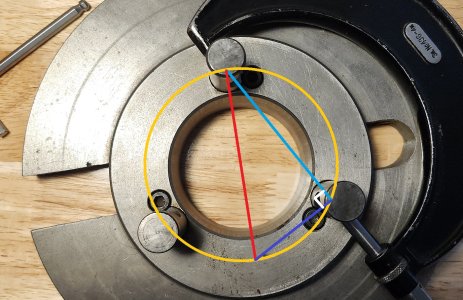
Now in taking this measurement, we’ll notice that these pins aren’t fastened into the face plate rigidly. They don’t bottom out in their countersink, and there’s some tolerance in the threads. The male threads and female threads aren’t a perfect fit, so there’s some play. What this means is that as you close the jaws or anvils of your calipers or micrometer, you’ll actually be pushing the pins closer together. Or, if you measure from the inside, you’ll be pushing them further apart. To minimize this effect, I measured as close to the bottom as could possibly get. My result, less the diameter of the pins and divided by cos(30), is 3.2522”. Pretty close to 3.25”, which is what all the cool kids say this dimension is, so let’s round to that.
Measuring the pins
It’ll be useful shortly to know the exact geometry of the pins and how they interface with the cams in the spindle, so let’s do that now. I didn’t take many pictures for this, but bear with me. We know from the last step that the nominal diameter is 0.625”. We know that the large “scallop” feature cut out of one side is to accept the cams in the spindle (the part you turn with the key to draw the chuck in). And if we eyeball it, we can be pretty sure that these cams all intersect with the spindle’s axis of rotation. That scallop’s radius is 3/8”, confirmed with radius gauges. Finally, if we measure the distance between the bottom of that scallop and the other side of the pin, and subtract the radius, we can find that the very bottom of that cutout must be 0.0625” from the centre of the part.
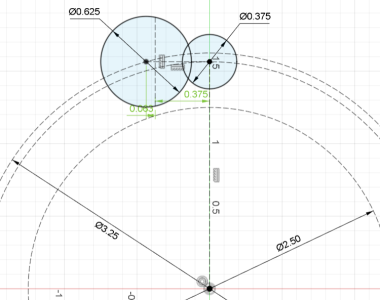
Knowing all that, I came up with the sketch below in CAD. First, let’s draw the PCD of 3.25”. Now let’s imagine that 1 of our 3 cams turns on the Y axis (green, vertical). We can draw a circle anywhere to the left of that axis and on the pitch circle. We’ll constrain it better shortly. This circle represents a camlock pin, so we’ll give it a diameter of 5/8”. We can also draw a construction line, representing the “bottom” of our scallop feature. We’ll make it parallel to our Y axis, and we’ll give it a distance of 3/8” from the Y axis. Remember, the purpose of this feature is to interface with the cam, which happens to have a diameter of 3/4" (or a radius of 3/8”). Finally, we’ll add a dimension so that the centre of the circle is 0.0625” from that line.
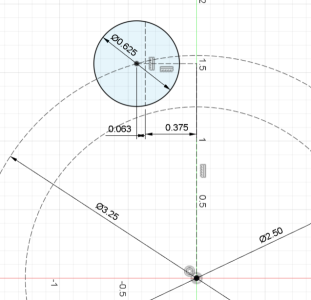
Now the position of that hole is fully constrained. We still don’t know where the smaller hole goes for the socket cap screw, so that’s our next step.
Distance between holes
Now, let’s look for the distance between the hole for the pin and the hole for the cap screw. Again, if you’re making everything from scratch the position of the hole for the socket cap screw technically shouldn’t matter much (as long as the pins are machined to match), but if you do make something non-standard, you’re stuck with it. So let’s try to work out what everyone else is doing.
This one’s a little funny. I couldn’t think of an excellent way to do this. The ol’ internal jaws on the calipers could work, but it’s annoying and usually not all that accurate. I could have machined a 0.400” pin to match the slot in the camlock stud and measured it that way, but I’m lazy. If I owned gauge pins this is surely what I would have done. Anyways, I thought I’d try a tool that normally just acts as a museum piece, my toolmaker’s microscope.
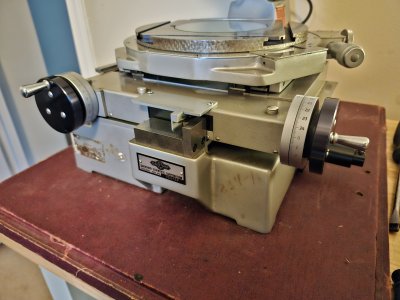
If you’ve never seen one of these, the idea is that you have an XY table (and in my case also a few different ways to measure angles) that you move around underneath a microscope, and take measurements by lining features up with the reticle, then by subtraction of your (very precise) micrometer dial readings (one micrometer on each axis, in this case accurate to 0.0001”).
So first, let’s throw the piece on the XY table and line our features up approximately with the lens.
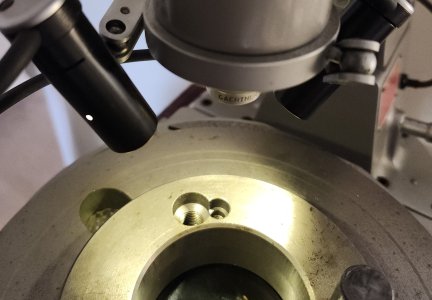
For this process, we’ll be measuring the countersunk holes (because threaded features are just a little trickier on this device). We’re making the assumption that they’re pretty well concentric to the threaded holes. The first thing we’ll do is measure the diameters. They’ll be different on every chuck, but here they were .6470” and .3986”. By the way, this is what this looks like through the eyepiece:
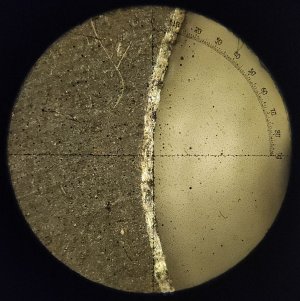
An optical comparator does a similar job, but would have struggled with these blind features (where there’s material behind).
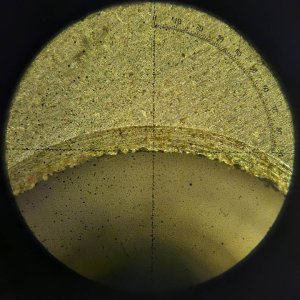
Next, we’ll want to measure the distance between the top of one hole, and the bottom of the next. Then, the left of one hole, to the right of the next. Your measurements here will be different depending on how you’ve laid the part on the table, so it’s important to not move it between measurements. (I don’t have clamps for this thing yet so I had to be really careful). As long as it’s the same between these two measurements, the orientation does not matter. The Pythagorean theorem will save us.
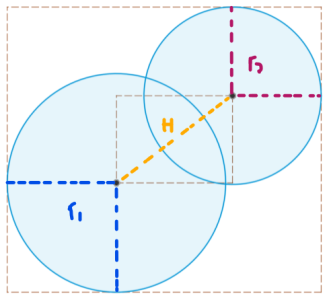
These two distances will give us the dimensions of this sort of circumscribed rectangle. In my case, it’s 0.7715” tall and 0.8779” wide. Subtracting the radius of each circle from both of these measurements gives me 0.3551” by 0.2487”, the dimensions of that inner rectangle. The Pythagorean tells us the distance between the centres of these circles should be 0.4335”. Now, that’s suspiciously close to 7/16”. So let’s round up.
Positioning the cap screw hole radially
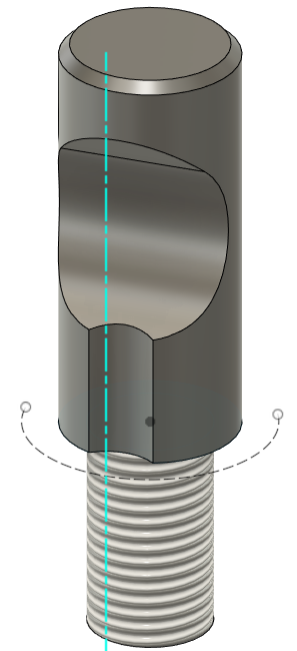
We know the distance between the two holes, now we’d like to position them relative to each other. Think of it this way: in the image above, the centre of that slot for the socket cap screw can technically go anywhere on that arc. I think it stands to reason, however, that the simplest possible position for it is such that the part is symmetrical. This would be the easiest configuration to machine, both on the back plate and on the pin. So going back to our sketch from before, we’d place the smaller hole exactly on the Y-axis, at the same height as our other hole.
Final drawings
This is getting quite long so I’ll skip the other few measurements that went into this. They would probably be a little less interesting to read about anyways. Here are the drawings I came up with.
Backplate drawing:
Camlock stud drawing:
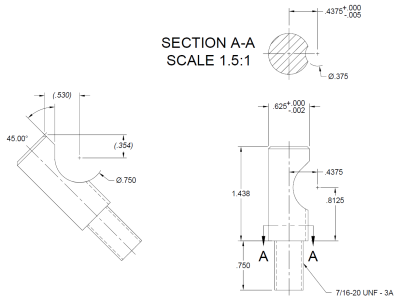
Finally, machining the pins
As I mentioned earlier, the post on this site by @mjautek goes over machining the tapered backing plate, and it’s well worth reading. I don’t have anything to add to it, so I won’t go over it here. Let’s talk about setting up the pins.
For material, I chose 4140 heat-treated, stress-relieved steel. I wanted some hardness, but I don’t have a way to heat treat anything myself, and didn’t want to subject my tools to any really hard stuff. So at 28 to 32 HRC, it’s great.
Lathe operations (part 1)
In the lathe, I turned down the 5/8” section, then the 7/16” section for the threads. I chamfered the ends, but did not cut the threads. Because I plan on clamping the 7/16” end in the vise on the mill, I didn’t want to risk mangling threads. So I ensured that my collet chuck could hold a machined end concentrically, and left the parts un-threaded before heading to the mill.
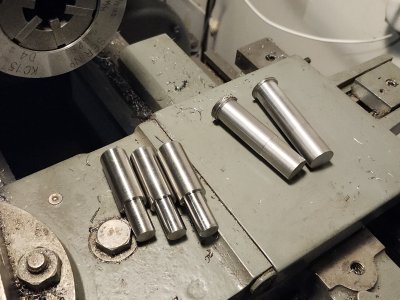
The two parts on the right were made with HSS. This worked okay, but the 4140 really ate the tool up. I had to sharpen it between pieces. I was using HSS because I’d tried earlier with carbide and must have been doing something wrong, as I wasn’t having any luck making something nice. After the third pin coming out really poorly with HSS, I went back to the carbide, and somehow turned out these 3 on the left. Really, really pretty parts. In person they looked unreal. I have no idea what changed between the first carbide attempt and the second. Maybe I forgot to tighten the tool post the first time. Anyways, off to the mill with 3 nice parts and 2 okay spares.
You may notice that I didn't machine a groove into these to indicate where to stop screwing them in. I don't think my work is precise enough for those marks to really mean anything, and these pins are just for me anyways. I opted to just figure it out with trial and error when the time came to screw them in.
Milling machine setup (part 1)
First, I set a vise up at 45 degrees. It’s worth noting that basically every other drawing on the internet calls the dimension of the little flat “ramp” on the scallop feature at 40 degrees. I figured that 45 was close enough, and the math was way easier to do for the setup, so I went with that. Spoiler: the part works fine with 45 degrees. No need to fret about the shallower 40 degrees if you don’t feel like it.
The part was clamped right at the edge of the vise, in a V-block. Now, as long as I butt every subsequent pin up to the vise jaws in the same way, I don’t have to re-indicate each one.
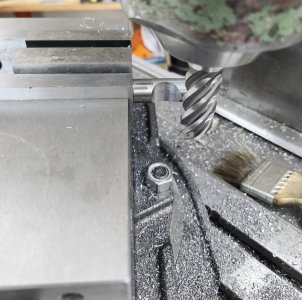
Next, I needed to find the sort of “corner” of the part, when looking at the downwards projection. With an edge finder, I found the edge of the round part with the Y-axis. Then, I made sure the X-axis was locked, and zero’d the DRO. (Lead screw backlash would have made this very tricky if all I had to go off of was the dials. There’s probably a way to do it, but it’s a real brain twister.) Next, I lowered the table, moved Y to the other side of the part, and raised the table again. Then, I found the edge on the flat face. From above, that looks something like this:
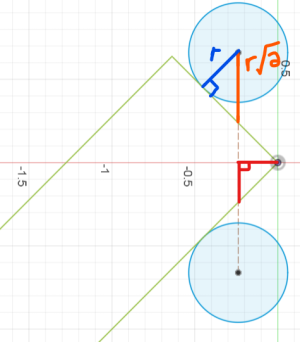
After finding the edge on the flat face, the distance in Y on our DRO is the distance between the centres of these two circles (the spots where the edge finder made contact). Without moving Y, we can press the “half” button on the DRO, and now we have Y=0 for the corner of the part.
Now, we have to figure out where we are in X. Drawing a line between the two circles makes a right triangle with the corner of the part, and the corner of the part (drawn in red above). So if we can figure out the length of the sections of that line “outside” the part, we can know our current distance in X from the corner. Remember: our X-axis is locked, we haven’t touched it. It turns out, if we multiply the diameter of the edge finder by the square root of 2 (in other words, divide by cos(45)), we know the length of that line “outside” the part. If we subtract it from our initial DRO value for Y (before we halved it), then divide that by 2, we get the lengths of those red lines, and our distance in X. We’ll plug that into the DRO, unlock our X axis, then travel over to the dimensions from our drawing. We’ll re-zero the DRO there so that our target while we’re machining is easier to remember.
Milling the camlock scallop
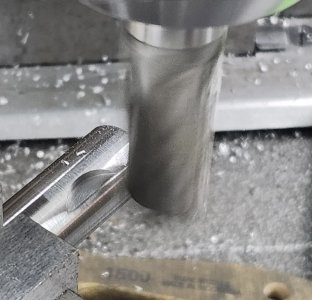
To machine the scallop, I started with the endmill outside the part, and machined in towards zero in the X axis. To start, I used a 3/4" end mill that had been sharpened down to about 7.30”. Because all I have is HSS and the workholding was a little flimsy, I was pretty conservative here. Slow hand-feed, and 0.030” passes. Also, this isn’t my machine, or my end mills.
To make sure that these features came out to exactly 3/8” in radius, I used a 3/4" HSS-cobalt finishing endmill. I plunged downwards at zero, then carefully fed outwards in X. I probably could have used the finishing endmill for everything, but this let me not worry as much about stopping at exactly zero on my in-feeding for each pass. And it left a beautiful finish.
Milling machine setup (part 2)
Next we’ll machine the slots in the sides of the pins for the socket cap screws. On the face plate I measured earlier, these slots had a radius of 0.200”. Well, I don’t have a 0.400” endmill, so 3/8” it is.
To make sure I knew where the scallop feature is that we just machined, I made a sort of “sacrificial” locating pin. Basically, just a 0.75”-diameter piece of aluminum with a flat machined into it. I trammed the vise back in at 0 degrees, then clamped the pin in the vise between my “locating” part and a V-block:
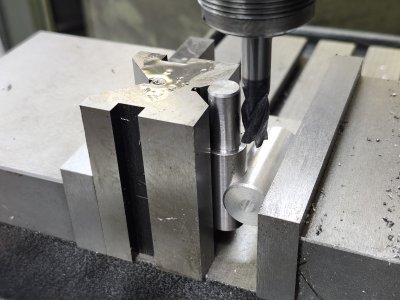
Same as before, as long as the V-block is set up flush with the edge of the vise jaws every time, there’ll be no need to edge find for all 3 parts. Next, I found the center of the part in X by using an edge finder on both ends of the V-block. This makes the assumption that the V-block is perfectly symmetrical. I didn’t verify this but fingers crossed. Same as before, zero the DRO after the first edge, then press the “half” button after the second edge, and travel to X=0.
Next, I used the edge finder again to find the edge of the part in Y. Once you have that, enter Y = 7/16” + the diameter of the edge finder, all divided by 2 in the DRO.
Milling the socket cap screw slot
Finally, I grabbed the 3/8” end mill, traveled to Y = 0.4375”, and plunged inwards. Now you can see why that aluminum piece is “sacrificial”. It has to get cut too.
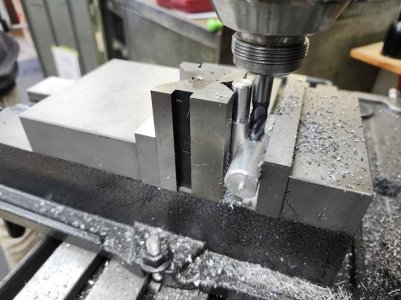
So that’s it for the mill! Back to the lathe.
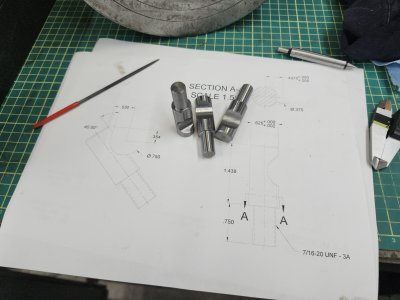
Ignore this drawing, there’s a couple mistakes in it that I’ve corrected in the version above.
Lathe operations (part 2, cutting threads)
There’s nothing really special about my process here. I used one of my 2 practice blanks to cut some practice threads, just because it’s been a long time since I’ve done so on material this hard.
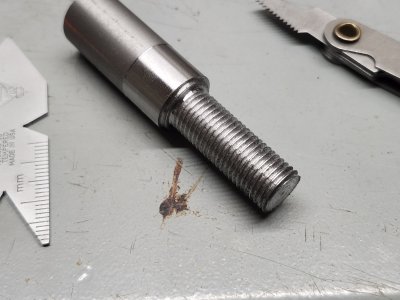
The threads here are a little gross looking under a bright light. For the real ones, my passes were lighter and I used oil for the final 3 passes on each pin. They turned out a bit better, but I do wonder what it would have looked like if I owned a carbide threading tool…
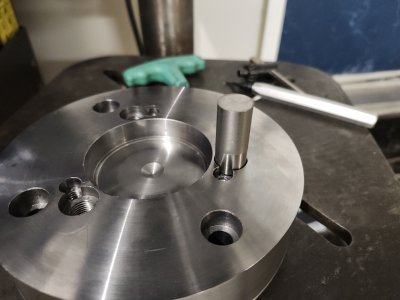
Great, my threading setup and math seems to work! Now for the real parts:
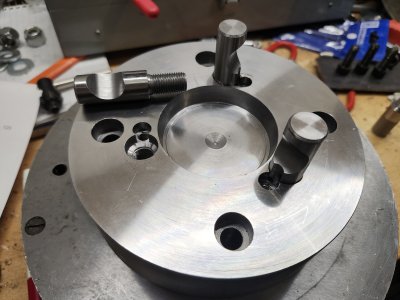
Nothin’ to it. Again, I fed in pretty conservatively here, about 0.003” on the compound (set at 29.5 degrees) to start, and 0.002” for the last few passes. The high speed steel tool I ground held up fine; I didn’t need to re-touch it at all between the three parts. I made sure the nose radius was present, but small to keep the cutting length of the tool to a minimum. After grinding the 60-degree V and the relief, I VERY lightly touched the tip to my fine grit wheel, then honed the nose radius in by hand with a 240-grit diamond stone.
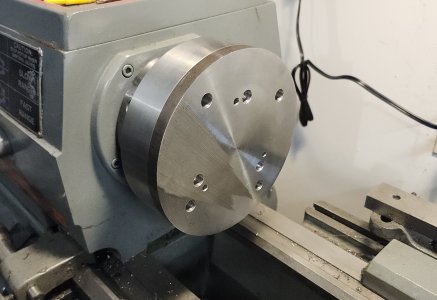
All that’s left is to take a little more material off of the back plate, and machine the locating feature for the mag chuck!
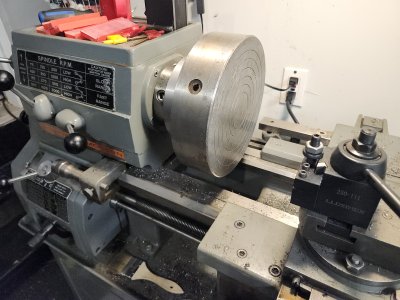
I’ll probably never use this stupid thing and I still have to make the weird Eclipse key to turn the magnets on. Thanks for reading!
Earlier this summer, I bought a Standard Modern series 2000 with a D1-4 spindle. It came with almost every kind of workholding imaginable, including a huge Eclipse magnetic chuck. For whatever reason, the mag chuck had a D1-3 back plate on it. So that had to be fixed. I looked for a used backplate or a chuck cheap enough to repurpose and steal its plate. No luck.
So, my options were as follows:
- Buy the pre-made import one online for ~$160, machine the locating feature, drill the mounting holes and call it a day.
- Spend probably close to 24 hours in front of machines, and nearly $160 between materials, gasoline, and new tools to make one that is arguably not as good.
I should have known that this would be a huge pain. Not just intuitively, but because a good friend of mine @mjautek already did this. If you’re thinking about making one of these for yourself, consider majutek’s post required reading. It’s excellent and full of good information.
Mjautek machined the backplate, but was able to scavenge some camlock pins. I was not able to find any pins, so I had to make them. My post will narrate my train of thought for measuring a D1-4 face plate I have, creating drawings, and the setup and machining of the pins based on the measurements and drawings. I'm no expert so I'm sure that in at least a few instances in this post, there's at least 1 better way to do what I did. Maybe with tools I don't have, or ideas I didn't think of. Comments are welcome.
But, I learned a lot while doing this and hopefully some of it ends up being useful to a few of you.
Measuring the camlock hole placement
First, let’s start with an incomplete drawing, then we’ll go over how I came to each of these measurements. This post will assume that you're familiar with how one of these chucks works. If you're not, Precision Matthews has published a good YouTube video on the subject. There are definitely other good videos out there.
There are 3 identical sets of holes spaced equally around the centre of these back plates. In each set, the larger hole holds the camlock pin that attaches to the lathe’s spindle. The smaller hole is for a socket cap screw, which holds the camlock in place rotationally by a slot in the pin sized to match the screw head. Technically, this probably isn’t the only way to make these things, but I’ve never seen it done any other way. If you ever want your pins to be interchangeable, this is how it’s gotta be done.
Important side note: The 15.6 degree dimension there is included for possible convenience. I suppose it’s possible that if someone’s mill and rotary table setup was weird enough, or at the extremities of axis travel, knowing that number would be the only good way to accurately position that hole. However, that number is driven by other features. We’ll see as we go on that this means (in this case,) that the ordinate dimensions of 0.4375” and 1.565” from centre for the pin hole, and 0” and 1.565” from centre for the cap screw hole, are based on the design of the part. The angle between the lines drawn between the centre and these two holes is a consequence of the other dimensions, nothing more.
PCD
First, let’s look at the PCD (pitch circle diameter) for the camlock pins. This is 3.25”. This fact is pretty well-documented, but let’s go through it anyways. I learned a thing or two here so maybe you will too.
To find this, I first measured the distance between two pins, from the outside. An important note: when you measure between two pins, you have to ensure that you’re measuring the shortest possible distance between them.
In the drawing above, the shortest possible distance between these two pins is the solid blue line. So, the jaws or anvils of your calipers or micrometers have to be perfectly perpendicular to that line to get a good measurement. Otherwise, you’re measuring the distance between the two long dotted orange lines. In reality, you’ll probably never be this far off without noticing. If you do measure it this way and you’re confident you’re pretty close, to find the PCD you’ll just divide that measurement by cos(30).
The reason we can do this is because a line drawn through one pin to the opposite side of the pitch circle (red, below), and the line made between two pins (light blue, below) are part of a right triangle, inscribed in the pitch circle. In the case of 3 pins, the angle between those 2 lines is 30 degrees.
Now in taking this measurement, we’ll notice that these pins aren’t fastened into the face plate rigidly. They don’t bottom out in their countersink, and there’s some tolerance in the threads. The male threads and female threads aren’t a perfect fit, so there’s some play. What this means is that as you close the jaws or anvils of your calipers or micrometer, you’ll actually be pushing the pins closer together. Or, if you measure from the inside, you’ll be pushing them further apart. To minimize this effect, I measured as close to the bottom as could possibly get. My result, less the diameter of the pins and divided by cos(30), is 3.2522”. Pretty close to 3.25”, which is what all the cool kids say this dimension is, so let’s round to that.
Measuring the pins
It’ll be useful shortly to know the exact geometry of the pins and how they interface with the cams in the spindle, so let’s do that now. I didn’t take many pictures for this, but bear with me. We know from the last step that the nominal diameter is 0.625”. We know that the large “scallop” feature cut out of one side is to accept the cams in the spindle (the part you turn with the key to draw the chuck in). And if we eyeball it, we can be pretty sure that these cams all intersect with the spindle’s axis of rotation. That scallop’s radius is 3/8”, confirmed with radius gauges. Finally, if we measure the distance between the bottom of that scallop and the other side of the pin, and subtract the radius, we can find that the very bottom of that cutout must be 0.0625” from the centre of the part.
Knowing all that, I came up with the sketch below in CAD. First, let’s draw the PCD of 3.25”. Now let’s imagine that 1 of our 3 cams turns on the Y axis (green, vertical). We can draw a circle anywhere to the left of that axis and on the pitch circle. We’ll constrain it better shortly. This circle represents a camlock pin, so we’ll give it a diameter of 5/8”. We can also draw a construction line, representing the “bottom” of our scallop feature. We’ll make it parallel to our Y axis, and we’ll give it a distance of 3/8” from the Y axis. Remember, the purpose of this feature is to interface with the cam, which happens to have a diameter of 3/4" (or a radius of 3/8”). Finally, we’ll add a dimension so that the centre of the circle is 0.0625” from that line.
Now the position of that hole is fully constrained. We still don’t know where the smaller hole goes for the socket cap screw, so that’s our next step.
Distance between holes
Now, let’s look for the distance between the hole for the pin and the hole for the cap screw. Again, if you’re making everything from scratch the position of the hole for the socket cap screw technically shouldn’t matter much (as long as the pins are machined to match), but if you do make something non-standard, you’re stuck with it. So let’s try to work out what everyone else is doing.
This one’s a little funny. I couldn’t think of an excellent way to do this. The ol’ internal jaws on the calipers could work, but it’s annoying and usually not all that accurate. I could have machined a 0.400” pin to match the slot in the camlock stud and measured it that way, but I’m lazy. If I owned gauge pins this is surely what I would have done. Anyways, I thought I’d try a tool that normally just acts as a museum piece, my toolmaker’s microscope.
If you’ve never seen one of these, the idea is that you have an XY table (and in my case also a few different ways to measure angles) that you move around underneath a microscope, and take measurements by lining features up with the reticle, then by subtraction of your (very precise) micrometer dial readings (one micrometer on each axis, in this case accurate to 0.0001”).
So first, let’s throw the piece on the XY table and line our features up approximately with the lens.
For this process, we’ll be measuring the countersunk holes (because threaded features are just a little trickier on this device). We’re making the assumption that they’re pretty well concentric to the threaded holes. The first thing we’ll do is measure the diameters. They’ll be different on every chuck, but here they were .6470” and .3986”. By the way, this is what this looks like through the eyepiece:
An optical comparator does a similar job, but would have struggled with these blind features (where there’s material behind).
Next, we’ll want to measure the distance between the top of one hole, and the bottom of the next. Then, the left of one hole, to the right of the next. Your measurements here will be different depending on how you’ve laid the part on the table, so it’s important to not move it between measurements. (I don’t have clamps for this thing yet so I had to be really careful). As long as it’s the same between these two measurements, the orientation does not matter. The Pythagorean theorem will save us.
These two distances will give us the dimensions of this sort of circumscribed rectangle. In my case, it’s 0.7715” tall and 0.8779” wide. Subtracting the radius of each circle from both of these measurements gives me 0.3551” by 0.2487”, the dimensions of that inner rectangle. The Pythagorean tells us the distance between the centres of these circles should be 0.4335”. Now, that’s suspiciously close to 7/16”. So let’s round up.
Positioning the cap screw hole radially
We know the distance between the two holes, now we’d like to position them relative to each other. Think of it this way: in the image above, the centre of that slot for the socket cap screw can technically go anywhere on that arc. I think it stands to reason, however, that the simplest possible position for it is such that the part is symmetrical. This would be the easiest configuration to machine, both on the back plate and on the pin. So going back to our sketch from before, we’d place the smaller hole exactly on the Y-axis, at the same height as our other hole.
Final drawings
This is getting quite long so I’ll skip the other few measurements that went into this. They would probably be a little less interesting to read about anyways. Here are the drawings I came up with.
Backplate drawing:
Camlock stud drawing:
Finally, machining the pins
As I mentioned earlier, the post on this site by @mjautek goes over machining the tapered backing plate, and it’s well worth reading. I don’t have anything to add to it, so I won’t go over it here. Let’s talk about setting up the pins.
For material, I chose 4140 heat-treated, stress-relieved steel. I wanted some hardness, but I don’t have a way to heat treat anything myself, and didn’t want to subject my tools to any really hard stuff. So at 28 to 32 HRC, it’s great.
Lathe operations (part 1)
In the lathe, I turned down the 5/8” section, then the 7/16” section for the threads. I chamfered the ends, but did not cut the threads. Because I plan on clamping the 7/16” end in the vise on the mill, I didn’t want to risk mangling threads. So I ensured that my collet chuck could hold a machined end concentrically, and left the parts un-threaded before heading to the mill.
The two parts on the right were made with HSS. This worked okay, but the 4140 really ate the tool up. I had to sharpen it between pieces. I was using HSS because I’d tried earlier with carbide and must have been doing something wrong, as I wasn’t having any luck making something nice. After the third pin coming out really poorly with HSS, I went back to the carbide, and somehow turned out these 3 on the left. Really, really pretty parts. In person they looked unreal. I have no idea what changed between the first carbide attempt and the second. Maybe I forgot to tighten the tool post the first time. Anyways, off to the mill with 3 nice parts and 2 okay spares.
You may notice that I didn't machine a groove into these to indicate where to stop screwing them in. I don't think my work is precise enough for those marks to really mean anything, and these pins are just for me anyways. I opted to just figure it out with trial and error when the time came to screw them in.
Milling machine setup (part 1)
First, I set a vise up at 45 degrees. It’s worth noting that basically every other drawing on the internet calls the dimension of the little flat “ramp” on the scallop feature at 40 degrees. I figured that 45 was close enough, and the math was way easier to do for the setup, so I went with that. Spoiler: the part works fine with 45 degrees. No need to fret about the shallower 40 degrees if you don’t feel like it.
The part was clamped right at the edge of the vise, in a V-block. Now, as long as I butt every subsequent pin up to the vise jaws in the same way, I don’t have to re-indicate each one.
Next, I needed to find the sort of “corner” of the part, when looking at the downwards projection. With an edge finder, I found the edge of the round part with the Y-axis. Then, I made sure the X-axis was locked, and zero’d the DRO. (Lead screw backlash would have made this very tricky if all I had to go off of was the dials. There’s probably a way to do it, but it’s a real brain twister.) Next, I lowered the table, moved Y to the other side of the part, and raised the table again. Then, I found the edge on the flat face. From above, that looks something like this:
After finding the edge on the flat face, the distance in Y on our DRO is the distance between the centres of these two circles (the spots where the edge finder made contact). Without moving Y, we can press the “half” button on the DRO, and now we have Y=0 for the corner of the part.
Now, we have to figure out where we are in X. Drawing a line between the two circles makes a right triangle with the corner of the part, and the corner of the part (drawn in red above). So if we can figure out the length of the sections of that line “outside” the part, we can know our current distance in X from the corner. Remember: our X-axis is locked, we haven’t touched it. It turns out, if we multiply the diameter of the edge finder by the square root of 2 (in other words, divide by cos(45)), we know the length of that line “outside” the part. If we subtract it from our initial DRO value for Y (before we halved it), then divide that by 2, we get the lengths of those red lines, and our distance in X. We’ll plug that into the DRO, unlock our X axis, then travel over to the dimensions from our drawing. We’ll re-zero the DRO there so that our target while we’re machining is easier to remember.
Milling the camlock scallop
To machine the scallop, I started with the endmill outside the part, and machined in towards zero in the X axis. To start, I used a 3/4" end mill that had been sharpened down to about 7.30”. Because all I have is HSS and the workholding was a little flimsy, I was pretty conservative here. Slow hand-feed, and 0.030” passes. Also, this isn’t my machine, or my end mills.
To make sure that these features came out to exactly 3/8” in radius, I used a 3/4" HSS-cobalt finishing endmill. I plunged downwards at zero, then carefully fed outwards in X. I probably could have used the finishing endmill for everything, but this let me not worry as much about stopping at exactly zero on my in-feeding for each pass. And it left a beautiful finish.
Milling machine setup (part 2)
Next we’ll machine the slots in the sides of the pins for the socket cap screws. On the face plate I measured earlier, these slots had a radius of 0.200”. Well, I don’t have a 0.400” endmill, so 3/8” it is.
To make sure I knew where the scallop feature is that we just machined, I made a sort of “sacrificial” locating pin. Basically, just a 0.75”-diameter piece of aluminum with a flat machined into it. I trammed the vise back in at 0 degrees, then clamped the pin in the vise between my “locating” part and a V-block:
Same as before, as long as the V-block is set up flush with the edge of the vise jaws every time, there’ll be no need to edge find for all 3 parts. Next, I found the center of the part in X by using an edge finder on both ends of the V-block. This makes the assumption that the V-block is perfectly symmetrical. I didn’t verify this but fingers crossed. Same as before, zero the DRO after the first edge, then press the “half” button after the second edge, and travel to X=0.
Next, I used the edge finder again to find the edge of the part in Y. Once you have that, enter Y = 7/16” + the diameter of the edge finder, all divided by 2 in the DRO.
Milling the socket cap screw slot
Finally, I grabbed the 3/8” end mill, traveled to Y = 0.4375”, and plunged inwards. Now you can see why that aluminum piece is “sacrificial”. It has to get cut too.
So that’s it for the mill! Back to the lathe.
Ignore this drawing, there’s a couple mistakes in it that I’ve corrected in the version above.
Lathe operations (part 2, cutting threads)
There’s nothing really special about my process here. I used one of my 2 practice blanks to cut some practice threads, just because it’s been a long time since I’ve done so on material this hard.
The threads here are a little gross looking under a bright light. For the real ones, my passes were lighter and I used oil for the final 3 passes on each pin. They turned out a bit better, but I do wonder what it would have looked like if I owned a carbide threading tool…
Great, my threading setup and math seems to work! Now for the real parts:
Nothin’ to it. Again, I fed in pretty conservatively here, about 0.003” on the compound (set at 29.5 degrees) to start, and 0.002” for the last few passes. The high speed steel tool I ground held up fine; I didn’t need to re-touch it at all between the three parts. I made sure the nose radius was present, but small to keep the cutting length of the tool to a minimum. After grinding the 60-degree V and the relief, I VERY lightly touched the tip to my fine grit wheel, then honed the nose radius in by hand with a 240-grit diamond stone.
All that’s left is to take a little more material off of the back plate, and machine the locating feature for the mag chuck!
I’ll probably never use this stupid thing and I still have to make the weird Eclipse key to turn the magnets on. Thanks for reading!


