
• Scam Alert. Members are reminded to NOT send money to buy anything. Don't buy things remote and have it shipped - go get it yourself, pay in person, and take your equipment with you. Scammers have burned people on this forum. Urgency, secrecy, excuses, selling for friend, newish members, FUD, are RED FLAGS. A video conference call is not adequate assurance. Face to face interactions are required. Please report suspicions to the forum admins. Stay Safe - anyone can get scammed.
  • The 2026 Calgary Area Meetup is set for Saturday May 30th at 10am. The signup thread is here! Robinhood has graciously offered to host the meetup again this year. Please note that you MUST RSVP to the notice linked above if you wish to come.

Best CAD export / import exchange format?

Janger

(John)
Premium Member
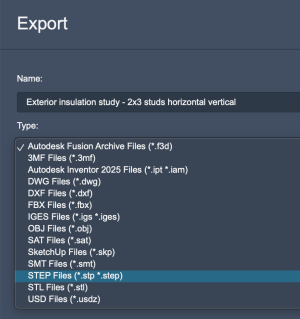
I'm considering ditching my Fusion subscription - not sure for what else though. I would want to export certain models for future reuse in another solution. Below is the list of export formats available. Which one will preserve the details the best? Can I keep the drawing timeline? Individual parts, bodies? The parametric approach?I know for example .stl and .3mf will be really poor.

Screenshot 2026-09-02 at 11.44.58 AM.png
 
Step is the best option. You will lose the feature tree, as that's proprietary to Fusion, but that doesn't mean it's uneditable. Some cad programs are also direct modelers too, and will see the step as a regular solid, just with neuorlized memory or how they came into being..... You can sketch on faces, push/pull, add holes etc just as you can with fusion. You just lose the continuity for features from the start. Admittedly my "current" CAD software knowledge is about a decade behind, so I wouldn't be surprised if features, and feature trees would also come with from software to software. Maybe not all of it, but perhaps some of it.
 
I'm considering ditching my Fusion subscription
Nothing better to offer on the file format advise beyond what has been said. I liken switching CAD to moving homes. Could be good, could be bad, but will be a PITA for a while until you settled in.
Just curious, was it growing disgruntlement? Particular issues/shortcomings? CAM? Or the renewal notice arrived? LOL

One day... I will get around to accessing SolidEdge & OneShape (in that perceived priority order) on my laptop just to poke around. The 'which CAD' has been bounced around here a lot. Much of the decision process I feel stems back to what you are familiar with & what you need to do with it. Then all the other issues, cost, cloud, learning resources.
 
I have yet to find a compelling reason to switch from Fusion. It has very functional CAM built in so round trips from Design to CAM are clear.
A big issue is (muscle) memory, as you get more familiar with a tool it becomes part of your subconcious. Plus the myriad of how-to on YT for when you get stuck.
I don't care about the cloud aspect since my data appears to be private. A benefit is that I can do edits on my laptop in the shop if things appear wonky during machining of a part on the CNC.
I also would be interested in why you want to switch. I have a designer friend who swears by Sketchup pro for his architectural work if that is your primary need.
 
it depends if there is much “pro” usage required, or whether you have a separate CAM solution already, but I really like FreeCAD once you get used to it.

I do the odd “pro” job for my work/side cash and it works fine for that for me.

Is it as polished as Fusion/Solidworks/Onshape/Alibre? No.

Do you need a separate CAM? Probably. Depends what you do.

The FreeCAD/Sheetcam combo is workable. MillMage I’ve heard good things about and light burn has always been solid, so they will keep upping the ante no doubt.

If you are doing Pro-Machinist 5 axis stuff and working with CNC Lathes, MillTurns, etc, I still think fusion is probably the best bang for the buck.

For me with a CNC Router, 3D printer, manual lathe/mill, and getting the odd sheet metal job cut and bent on contract, FreeCAD/SheetCam is the ticket. (PrusaSlicer for 3d Printer)

If you have to “live” in the software and make a bunch of money with it then ya, I would choose Fusion likely. Or Alibre with a CAM package.
 
@DavidR8 is E-CAM Cad agnostic? ie regardless of where the .STEP file originated from, it goes to work? Or is it more integrated with Alibre Cad (the way I understand F360 to be).
 
@DavidR8 is E-CAM Cad agnostic? ie regardless of where the .STEP file originated from, it goes to work? Or is it more integrated with Alibre Cad (the way I understand F360 to be).
It's completely agnostic.
I have been playing around with it and I'm super impressed.
Like Alibre, it just seems to click for me.
Support is excellent too. Early on I had questions, emailed the support line and got an answer in a couple of hours despite them being in Italy.
 
I think this thread lost the plot slightly... @Janger was looking for a way to transfer his files to another program with as little data loss as possible. In pretty much all cases I'm sure that's .step/.stp.

Depending what software he's migrating to, there might be some arcane software that takes the .f3d and tries to keep the feature tree, but I wouldn't count on it. If it did work well, it's probably expensive anyways.
 
I think this thread lost the plot slightly... @Janger was looking for a way to transfer his files to another program with as little data loss as possible. In pretty much all cases I'm sure that's .step/.stp.

Depending what software he's migrating to, there might be some arcane software that takes the .f3d and tries to keep the feature tree, but I wouldn't count on it. If it did work well, it's probably expensive anyways.
Yes, apologies for the drift. My only point was that losing the Fusion CAM capabilities need not be a deterrent.
 
as other have said, stp is the best fo rthe least data loss, but there is still loss. Depending on how much effort went into the part, you could take other measures to help minimize the pain. You can export suff like your sketches to a dxf format. So you might end up with a folder of the parts you are trying to save, with a stp file, and maybe several dxf for sketches.
 
looking for a way to transfer his files to another program with as little data loss as possible.
There really isn't a way to that unless the new program uses the same file format. I have used STEP to transfer files and I can just drag an drop my old Inventor files into Solidedge and it will just convert them automatically BUT you will lose the history. It is still an editable solid from either format. I'm sure most other formats would work in the same manner.
 
Back
Top